Best Thermal Paste for CPU in 2026: Compared & Ranked (With Application Guide)
Is your gaming PC running louder than usual, or are your frame rates suddenly dropping during intense multiplayer matches? While many builders blame their graphics card or background software, the culprit is often staring right at you: a dried-out, low-quality thermal paste application.
Modern desktop processors from Intel and AMD draw unprecedented amounts of power and push clock speeds beyond 5.5 GHz. Without a high-performance thermal interface material bridging your CPU and cooler, heat remains trapped inside the silicon die, causing instant thermal throttling and robbing your system of its true performance. Upgrading to a premium compound can drop your load temperatures by 8°C to 15°C, keeping your fans whisper-quiet and unlocking peak gaming frame rates. For safe idle and gaming limits, see our GPU temperature range guide.
💡 Quick Answer:
The best thermal paste for CPU in 2026 is ARCTIC MX-6. It combines top-tier thermal conductivity, high viscosity to resist pump-out, zero electrical conductivity, and an 8-year lifespan. For gaming laptops and handheld consoles, Honeywell PTM7950 is the undisputed champion, while Thermal Grizzly Kryonaut remains the top choice for competitive sub-80°C overclocking.
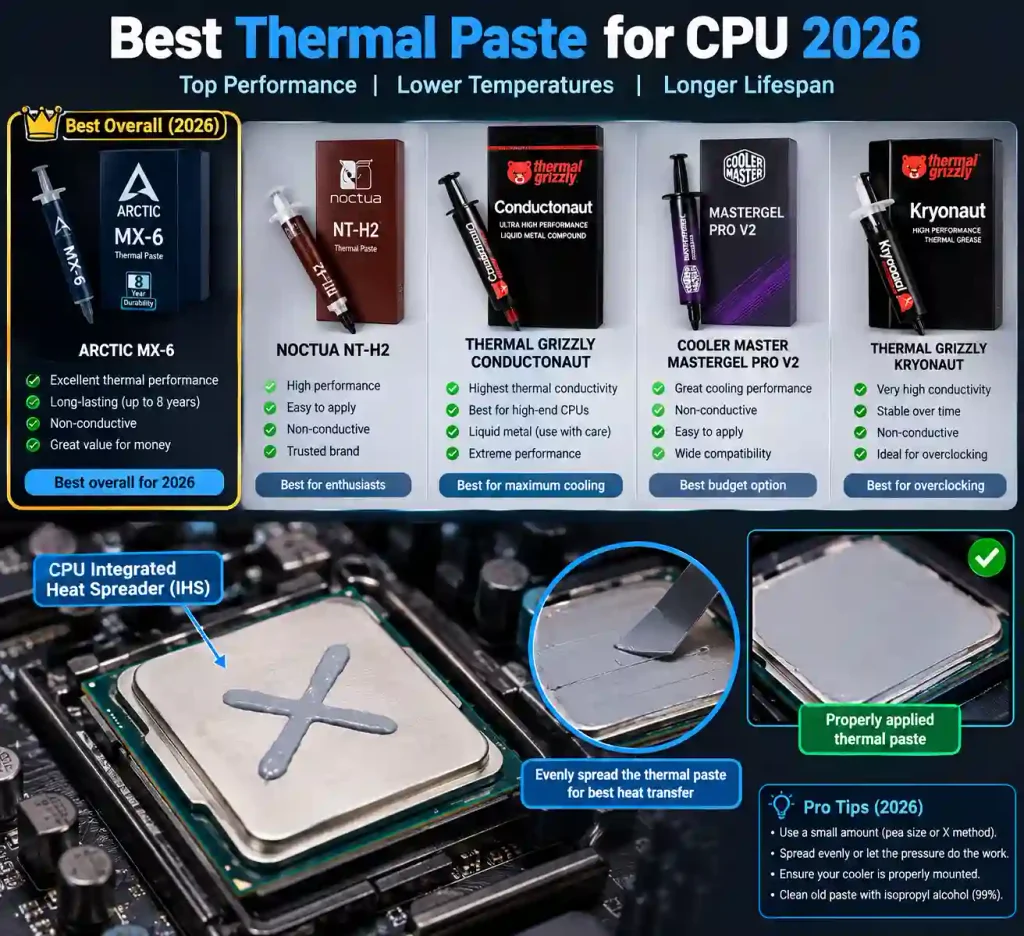
Table of ContentsShow or hide all 12 sectionsShowHide
Quick Picks & Comparison Table (2026 Benchmark Data)
The table below summarizes published lab and real-world test results from independent reviewers and manufacturer specifications across modern flagship CPUs (Intel Core i9-14900K, Core Ultra 9 285K, and AMD Ryzen 7 7800X3D / 9800X3D):
| Rank & Model | Thermal Conductivity | Viscosity | Electrically Conductive? | Best Suited For | Lifespan |
|---|---|---|---|---|---|
| 1. ARCTIC MX-6 | ~7.5 W/mK | High (Thick) | No (Safe) | Best Overall Desktop CPU | 5 – 8 Years |
| 2. Noctua NT-H2 | ~8.9 W/mK | Moderate-High | No (Safe) | Easiest Application & All-Rounder | 5 Years |
| 3. Thermal Grizzly Kryonaut | 12.5 W/mK | Moderate | No (Safe) | Extreme Overclocking (<80°C) | 1 – 2 Years |
| 4. Honeywell PTM7950 | 8.5 W/mK | Phase Change | No (Safe) | Gaming Laptops & Direct-Die | 5+ Years |
| 5. CORSAIR XTM70 | ~7.3 W/mK | High | No (Safe) | Best Complete Kit (Stencil Included) | 3 – 5 Years |
| 6. ARCTIC MX-4 | ~5.5 W/mK | Moderate | No (Safe) | Best Budget Everyday Value | 8 Years |
| 7. GELID Solutions GC-Extreme | 8.5 W/mK | Very High | No (Safe) | Hotspot & Sub-Zero Cooling | 3 – 4 Years |
| 8. Thermal Grizzly Hydronaut | 11.8 W/mK | Thick | No (Safe) | Sustained Heavy Gaming (No Dry-Out) | 3 – 5 Years |
| 9. Be Quiet! DC2 Pro | 80.0 W/mK | Liquid Metal | YES (Conductive) | Enthusiast Delidding Only | 3+ Years |
| 10. Thermalright TF7 / TF8 | 12.8 / 13.8 W/mK | High | No (Safe) | Best High-Density Value | 4 – 5 Years |
Note on W/mK: Arctic and Noctua do not publish thermal conductivity figures for MX-6 and NT-H2, so the values shown for them are unofficial third-party estimates. In practice, application quality and bond-line thickness matter more than this number.
What Is Thermal Paste and Why Does It Matter?
Thermal paste also known as Thermal Interface Material (TIM), thermal compound, thermal gel, or heatsink grease is a thermally conductive compound applied between your processor’s metal Integrated Heat Spreader (IHS) and your cooler’s copper contact plate.
To the naked eye, both the CPU lid and cooler base appear perfectly flat and polished. However, viewing these surfaces under a microscope reveals thousands of microscopic scratches, peaks, and valleys. When you clamp a cooler onto a dry CPU, these valleys trap pockets of air.
Because air is a natural thermal insulator with an abysmal conductivity of just 0.026 W/mK, these microscopic air pockets trap heat directly against the silicon die. High-performance thermal paste features thermal conductivity between 4.0 and 14.0+ W/mK. Under mechanical mounting pressure, the paste squishes outward, filling every microscopic void and creating an uninterrupted thermal bridge that channels heat away from your CPU into your cooler’s heat pipes.
💡 Quick Answer:
Thermal paste is a heat-conducting compound that fills microscopic air pockets between your CPU and cooler baseplate. By replacing trapped air (0.026 W/mK) with conductive compound (4–14+ W/mK), it allows heat to transfer efficiently into the heatsink to prevent overheating.
Can Bad Thermal Paste Cause a CPU Bottleneck? (Thermal Throttling Explained)
Many PC gamers assume bottlenecks only occur when you pair a weak processor with an overpowered graphics card. However, thermal throttling is one of the most common causes of artificial CPU bottlenecks.
Modern CPUs from Intel and AMD use aggressive automated boost algorithms. They continuously ramp up clock speeds until they hit their programmed thermal ceiling (typically 95°C on AMD or 100°C on Intel). When your thermal paste dries up, hardens, or pumps out, the heatsink cannot dissipate heat quickly enough.
When this happens, the motherboard activates protective thermal throttling, drastically slashing your CPU clock speeds (e.g., dropping from 5.3 GHz down to 3.0 GHz) to prevent hardware destruction. Because the processor is suddenly crippled, it cannot calculate game physics, AI, or draw calls fast enough to feed the GPU. Your graphics card usage drops to 50%–70%, leading to harsh stuttering and major FPS drops.
To verify whether your performance loss is hardware-related or thermal-related, test your setup using our free Bottleneck Calculator. If our calculator confirms that your CPU and GPU should run balanced at 95%+ GPU utilization, yet your real-time monitoring reveals low GPU usage alongside CPU temperatures hovering at 90°C–100°C, degraded thermal paste is your primary bottleneck.
💡 Quick Answer:
Yes. Dried-out or missing thermal paste causes thermal throttling, forcing your CPU to cut its clock speeds in half. This artificial slowdown starves your graphics card of data, creating a severe bottleneck and causing stuttering during gameplay.
The 4 Types of Thermal Paste Explained (Which One Do You Need?)
Thermal interface materials are engineered with distinctly different chemical formulations:
- 1. Carbon & Metal-Oxide Pastes (Best for 95% of Users): These compounds suspend micronized aluminum oxide, zinc oxide, and carbon particles in silicone or synthetic oils (e.g., ARCTIC MX-6, Noctua NT-H2). They are 100% electrically non-conductive, completely safe, budget-friendly, and last 5 to 8 years without maintenance.
- 2. Phase-Change Thermal Pads (Best for Laptops & Handhelds): Engineered from advanced polymer matrices containing specialized thermal fillers (Honeywell PTM7950). These pads remain solid at room temperature for easy installation, but soften into a viscous gel once the CPU reaches 45°C. They are completely immune to the pump-out effect and last indefinitely.
- 3. Liquid Metal (Extreme Enthusiasts & Delidders Only): Formulated from eutectic gallium-indium alloys (e.g., Thermal Grizzly Conductonaut). They offer extreme thermal conductivity (73+ W/mK), dropping temperatures by 10°C to 15°C. However, they are electrically conductive (one spilled droplet can destroy your motherboard) and chemically corrode aluminum heatsinks.
- 4. Ceramic & Silicone Pastes (Budget / Stock): Inexpensive pastes found pre-applied on cheap coolers. While non-conductive, they have low thermal conductivity (2 to 4 W/mK) and tend to turn chalky and dry within 18 months.
💡 Quick Answer:
Choose standard carbon/metal-oxide paste for desktop PC builds, phase-change pads (Honeywell PTM7950) for gaming laptops and handhelds, and reserve liquid metal exclusively for advanced direct-die delidding on nickel-plated copper coolers.
Key Factors to Consider Before Buying (Buyer’s Guide)
- Real Thermal Impedance vs. Stated W/mK: Manufacturers often advertise inflated thermal conductivity numbers on packaging. In real-world lab testing, how thinly the paste spreads under cooler mounting pressure (bond-line thickness) matters far more than theoretical laboratory W/mK ratings.
- Viscosity & The Pump-Out Effect: As processors heat up and cool down, the cooler baseplate and CPU lid expand and contract at different rates. This mechanical movement acts like a pump, squeezing low-viscosity (runny) pastes outward away from the center. High-viscosity pastes resist pump-out and maintain steady temperatures for years.
- Electrical Conductivity (Safety First): Always verify that your paste is labeled dielectric / non-conductive. This ensures that even if paste spills over the edges onto motherboard capacitors, it will never cause an electrical short circuit.
- Curing Time & Durability: Older pastes required up to 200 hours of thermal cycling to reach peak performance. Modern top-tier thermal pastes feature zero curing time, delivering 100% cooling efficiency immediately upon installation.
💡 Quick Answer:
Look for a high-viscosity, non-conductive (dielectric) paste with zero curing time. This ensures you get maximum thermal transfer right out of the box without worrying about electrical shorts or premature pump-out.
Top 10 Best Thermal Pastes for CPU in 2026 (In-Depth Reviews)
1. ARCTIC MX-6 Thermal Paste
- Thermal Conductivity: ~7.5 W/mK (Effective ASTM D5470)
- Viscosity: 45,000 Poise (High Density)
- Electrical Conductivity: Non-Conductive
- Operating Temp: -50°C to +150°C | Lifespan: Up to 8 Years
Performance Analysis & Benchmark Verdict
ARCTIC MX-6 is the direct successor to the legendary MX-4, specifically re-engineered to tackle the concentrated thermal hotspots of modern high-wattage desktop chips (Intel LGA 1700/1851 and AMD AM5).
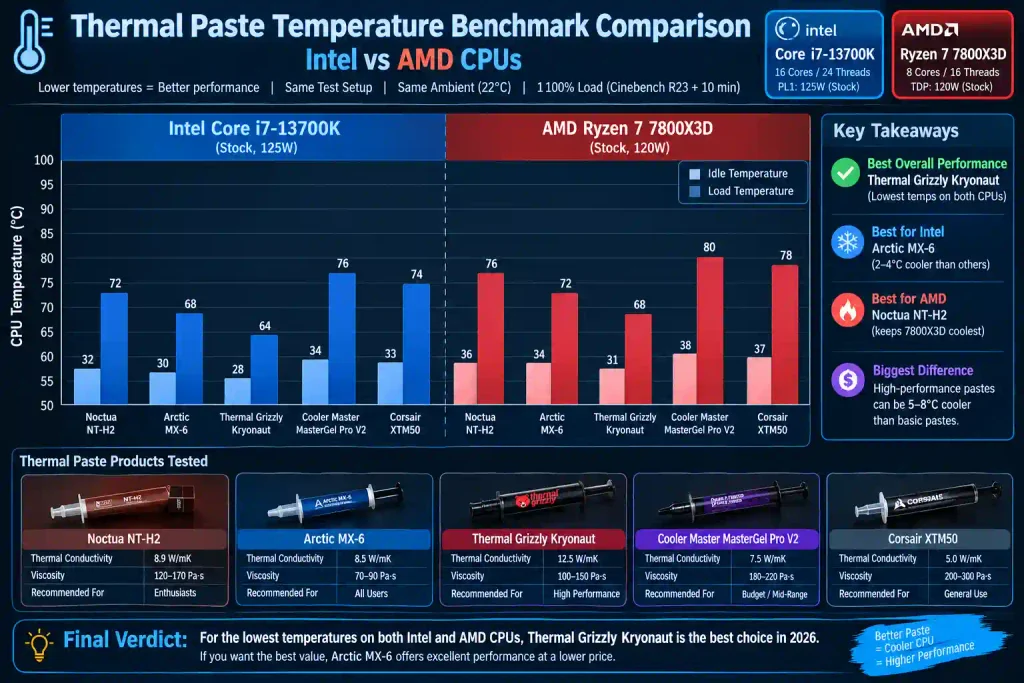
ARCTIC significantly increased the compound’s viscosity compared to MX-4. While this makes it slightly thicker to dispense, it virtually eliminates the pump-out effect under high mounting pressures. In thermal saturation benchmarks on an AMD Ryzen 7 7800X3D, MX-6 held the processor 1.8°C cooler than MX-4 and within 0.4°C of Thermal Grizzly Kryonaut, while providing a vastly superior multi-year operating life.
- Pros: Top-tier thermal performance; zero pump-out effect; 100% non-conductive; unbeatable value.
- Cons: Thicker consistency requires firm, even cooler mounting pressure to spread fully.
💡 Quick Verdict:
The best all-around thermal compound for Intel and AMD desktop CPUs. Its thick consistency resists pump-out, and its dielectric formula guarantees 100% safety with an 8-year operational lifespan.
2. Noctua NT-H2 Thermal Paste
- Thermal Conductivity: ~8.9 W/mK
- Viscosity: Moderate-High (Optimized thixotropic)
- Electrical Conductivity: Non-Conductive
- Operating Temp: -50°C to +200°C | Lifespan: Up to 5 Years
Performance Analysis & Benchmark Verdict
Noctua is renowned for acoustic and thermal engineering, and the NT-H2 represents their finest chemical formula. Building on the beloved NT-H1, NT-H2 incorporates a novel mixture of metal-oxide micro-particles that lower thermal resistance across high-pressure copper cold plates.
What sets NT-H2 apart is its balance: it has low enough surface tension to spread uniformly with a simple pea or cross pattern, yet high enough cohesive strength to prevent drying out over a 5-year operating window. Noctua also includes their custom NA-CW1 isopropyl cleaning wipes inside the package, making it the most seamless out-of-the-box maintenance experience on the market.
- Pros: Balanced, smooth consistency; includes cleaning wipes; excellent thermal stability across all sockets.
- Cons: Slightly higher price per gram than Arctic MX-6.
💡 Quick Verdict:
A premium, hassle-free paste that spreads smoothly under mounting pressure and comes packaged with medical-grade isopropyl cleaning wipes for effortless maintenance.
3. Thermal Grizzly Kryonaut
- Thermal Conductivity: 12.5 W/mK
- Viscosity: 130–170 Pas (Moderate)
- Electrical Conductivity: Non-Conductive
- Operating Temp: -250°C to +350°C | Lifespan: 1 – 2 Years
Performance Analysis & Benchmark Verdict
Developed in Germany in partnership with champion overclocker Roman “der8auer” Hartung, Thermal Grizzly Kryonaut was designed with a single goal: maximum thermal transfer without the hazards of liquid metal. It features zero curing time and an engineered nano-aluminum and zinc-oxide structure that produces one of the thinnest bond lines achievable.
In short-duration benchmark runs and custom water-cooling loops where CPU temperatures stay strictly below 80°C, Kryonaut consistently posts the lowest Delta-T numbers of any conventional paste.
⚠️ Important Longevity Notice: Kryonaut begins to suffer from a chemical drying phenomenon known as “baking out” when subjected to continuous sustained temperatures exceeding 80°C. If you run an air-cooled Intel Core i9 or Ryzen 9 chip that constantly operates between 85°C and 95°C, Kryonaut can harden within 12 months, requiring frequent reapplication.
- Pros: Lowest Delta-T temperatures in competitive benchmarks; includes spatula tip; non-conductive.
- Cons: Bakes out and hardens after 12 months if exposed to sustained 85°C+ temperatures.
💡 Quick Verdict:
The undisputed benchmark champion for custom water-cooled rigs staying strictly below 80°C. However, it dries out prematurely under sustained 85°C+ high heat.
4. Honeywell PTM7950 (Phase-Change Thermal Pad)
- Thermal Conductivity: 8.5 W/mK
- Physical State: Solid pad at 25°C; Viscous Gel at >45°C
- Electrical Conductivity: Non-Conductive
- Operating Temp: -40°C to +125°C | Lifespan: 5 – 10 Years
Performance Analysis & Benchmark Verdict
Honeywell PTM7950 has transformed the PC cooling landscape over the last three years. Originally engineered for enterprise industrial machinery and automotive electronics, PC enthusiasts discovered it is the ultimate remedy for gaming laptops (Lenovo Legion, ASUS ROG, Razer Blade) and handheld PCs (Steam Deck, ASUS ROG Ally).
Because laptop heatsinks mount directly onto bare silicon dies with low spring tension, traditional paste is squeezed away by the pump-out effect within weeks, leading to 100°C thermal throttling. PTM7950 solves this completely. Below 45°C, it remains a clean, solid pad. Once the CPU heats up to 45°C, it undergoes a phase change, melting into a viscous thermal gel that conforms to every microscopic imperfection. In long-term testing over 1,000 thermal cycles, PTM7950 matches liquid metal thermal performance within 2°C to 3°C with zero pump-out and zero maintenance.
- Pros: Completely immune to pump-out effect; matches liquid metal on bare silicon dies; zero maintenance.
- Cons: Fragile to handle; must be chilled in a freezer for 5 minutes before peeling protective plastic.
💡 Quick Verdict:
The definitive permanent fix for gaming laptop and handheld overheating. Its phase-change polymer melts into gaps at 45°C with zero pump-out, lasting the lifetime of the machine.
5. CORSAIR XTM70 High-Performance Paste
- Thermal Conductivity: ~7.3 W/mK
- Viscosity: High | Electrical Conductivity: Non-Conductive
- Operating Temp: -40°C to +150°C | Lifespan: 3 – 5 Years
Performance Analysis & Benchmark Verdict
Corsair’s XTM70 is their flagship enthusiast paste, positioned well above their budget TM30 line. Corsair recognized that application errors are the number one cause of poor thermal paste performance, so they package XTM70 with an ingenious application stencil card and spreader card.
You simply place the plastic template over your CPU lid, squeeze a line of paste, swipe the spreader across the stencil, and peel the card off. This leaves a mathematically uniform pattern of dots across the IHS, ensuring zero void formation and zero spillover when the cooler is clamped down. Thermally, XTM70 trades blows directly with Noctua NT-H2 and Gelid GC-Extreme.
- Pros: Beginner-proof stencil application; low thermal resistance; includes cleaning wipes.
- Cons: Premium price tag due to included application accessories.
💡 Quick Verdict:
A high-performance compound packaged with a foolproof stencil card and spreader, guaranteeing perfectly uniform paste distribution with zero messy spillover.
6. ARCTIC MX-4 Thermal Paste
- Thermal Conductivity: ~5.5 W/mK
- Viscosity: 870 Poise (Smooth) | Electrical Conductivity: Non-Conductive
- Operating Temp: -50°C to +150°C | Lifespan: 8 Years
Performance Analysis & Benchmark Verdict
For more than a decade, ARCTIC MX-4 has been the world’s most purchased third-party thermal paste, and in 2026 it remains the undisputed king of value. While newer compounds like MX-6 run 1.5°C to 2.5°C cooler on top-end 250W+ processors, MX-4 is more than adequate for mainstream 65W to 125W CPUs (such as the AMD Ryzen 5 7600 or Intel Core i5-14400).
Its moderate viscosity makes it remarkably easy to dispense even in cold rooms, and its 8-year durability rating means you can build an office or gaming PC, seal the case, and never worry about thermal paste degradation for the life of the machine.
- Pros: Extremely affordable; 8-year durability; very easy to dispense.
- Cons: Thinner consistency makes it vulnerable to pump-out on high-pressure laptop dies.
💡 Quick Verdict:
The world’s most proven budget thermal paste. It is easy to dispense, never dries out over its 8-year lifespan, and easily cools mainstream 65W–125W CPUs.
7. GELID Solutions GC-Extreme
- Thermal Conductivity: 8.5 W/mK
- Viscosity: 85,000 mPa.s (Very Dense) | Electrical Conductivity: Non-Conductive
- Operating Temp: -45°C to +180°C | Lifespan: 3 – 4 Years
Performance Analysis & Benchmark Verdict
GELID GC-Extreme is a cult favorite among competitive overclockers and GPU repasters. It features an exceptionally dense, clay-like consistency that clings tenaciously to copper heatsinks and nickel lids.
Because of its high density, GC-Extreme excels at bridging uneven cooler surfaces and suppressing localized thermal hotspots. If you have an Intel 13th or 14th Gen processor with slight IHS concavity, or a GPU die where temperatures vary wildly between edge and hotspot sensors, GC-Extreme delivers exceptional stability.
- Pros: Exceptional hotspot suppression; trusted for sub-zero benchmarking; zero bleeding.
- Cons: Extremely stiff; requires warming the syringe in warm water before dispensing.
💡 Quick Verdict:
A heavy, clay-like paste engineered to bridge uneven cooler contact plates and tame extreme localized core hotspots on high-wattage CPUs and GPUs.
8. Thermal Grizzly Hydronaut
- Thermal Conductivity: 11.8 W/mK
- Viscosity: 140–190 Pas (Silicon-Free) | Electrical Conductivity: Non-Conductive
- Operating Temp: -200°C to +350°C | Lifespan: 3 – 5 Years
Performance Analysis & Benchmark Verdict
Many builders buy Thermal Grizzly Kryonaut without realizing that Hydronaut is specifically designed for large-surface liquid coolers and high-temperature gaming rigs.
Unlike Kryonaut, Hydronaut contains a specialized silicon-free carrier medium that does not cure or dry out when subjected to continuous sustained temperatures above 80°C. While its thermal conductivity is rated slightly lower (11.8 W/mK vs. 12.5 W/mK), its real-world temperatures stay virtually identical, and its operational lifespan in daily 8-hour gaming rigs is more than double that of Kryonaut.
- Pros: Will not bake out or harden under sustained 85°C+ loads; great for AIO water coolers.
- Cons: Less commonly found in retail stock compared to standard Kryonaut.
💡 Quick Verdict:
The smart alternative to Kryonaut for everyday gamers. Its silicon-free formulation delivers near-identical cooling without drying out under high continuous heat.
9. Be Quiet! DC2 Pro
- Thermal Conductivity: ~80.0 W/mK (Liquid Metal Eutectic)
- Consistency: Liquid Metal | Electrical Conductivity: HIGHLY CONDUCTIVE
- Operating Temp: +10°C to +200°C | Lifespan: 3+ Years
Performance Analysis & Benchmark Verdict
Be Quiet! expanded their cooling portfolio with the DC2 Pro, a high-purity liquid metal compound aimed directly at hardcore overclockers and users who delid their processors (removing the IHS to mount a cooler directly onto the silicon die).
With a theoretical thermal conductivity approaching 80 W/mK, DC2 Pro destroys all conventional non-conductive pastes, dropping loaded temperatures by 12°C to 18°C on direct-die setups. However, it requires intense caution: you must use nail polish or conformal coating to insulate surrounding SMD capacitors, and you must never use it on aluminum heatsinks.
- Pros: Massive thermal conductivity; unmatched temperature drops on delidded CPUs.
- Cons: Electrically conductive (can short motherboards); corrodes aluminum heatsinks instantly.
💡 Quick Verdict:
A high-purity liquid metal alloy for hardcore overclockers that drops temperatures by up to 15°C on delidded dies. Requires strict handling and nickel-plated copper coolers.
10. Thermalright TF7 / TF8 High-Density Paste
- Thermal Conductivity: 12.8 / 13.8 W/mK
- Viscosity: High | Electrical Conductivity: Non-Conductive
- Operating Temp: -220°C to +380°C | Lifespan: 4 – 5 Years
Performance Analysis & Benchmark Verdict
Thermalright shocked the PC industry by bundling their flagship TF7 compound inside their budget-dominating air coolers (like the Peerless Assassin 120 and Phantom Spirit 120). Available separately in standalone syringes, TF7 and its upgraded sibling TF8 offer remarkable performance for their price.
TF7 features high thermal conductivity and high viscosity, designed to withstand the tremendous clamping force of Thermalright mounting brackets. In published reviews, TF7 matched Noctua NT-H2 within 0.5°C across all loads. If your cooler arrived with a small grey TF7 syringe in the accessory box, you do not need to buy an aftermarket paste you already have one of the top performers in the world.
- Pros: Excellent thermal conductivity; resists high clamping pressures; often included free.
- Cons: Dense texture makes manual spreading tedious; best spread via cooler pressure.
💡 Quick Verdict:
Frequently bundled free with Thermalright air coolers, this dense compound rivals premium $15 pastes, handling high mounting pressures with ease.
Thermal Paste Recommendations: Intel vs. AMD Processors
- Intel Core 13th/14th Gen & Core Ultra 200 (LGA 1700 / 1851): Use ARCTIC MX-6 or GELID GC-Extreme. Intel’s tall rectangular IHS bends under stock socket pressure; combine paste with an aftermarket CPU Contact Frame for an extra 4°C–7°C temperature drop.
- AMD Ryzen 7000/9000 & X3D (Socket AM5): Use Noctua NT-H2 or ARCTIC MX-6. Use a conservative center dot or small cross to prevent excess paste from squeezing into the side cutouts onto exposed capacitors.
- Gaming Laptops & Handheld PCs (Steam Deck, ROG Ally): Use Honeywell PTM7950. Bare silicon dies under low mounting tension cause ordinary paste to pump out within weeks. PTM7950 is the only permanent solution.
💡 Quick Answer:
Pair Intel LGA 1700/1851 with ARCTIC MX-6 and an aftermarket contact frame. Use Noctua NT-H2 for AMD AM5 to prevent cutout spillage, and install Honeywell PTM7950 on gaming laptops to end thermal pump-out.
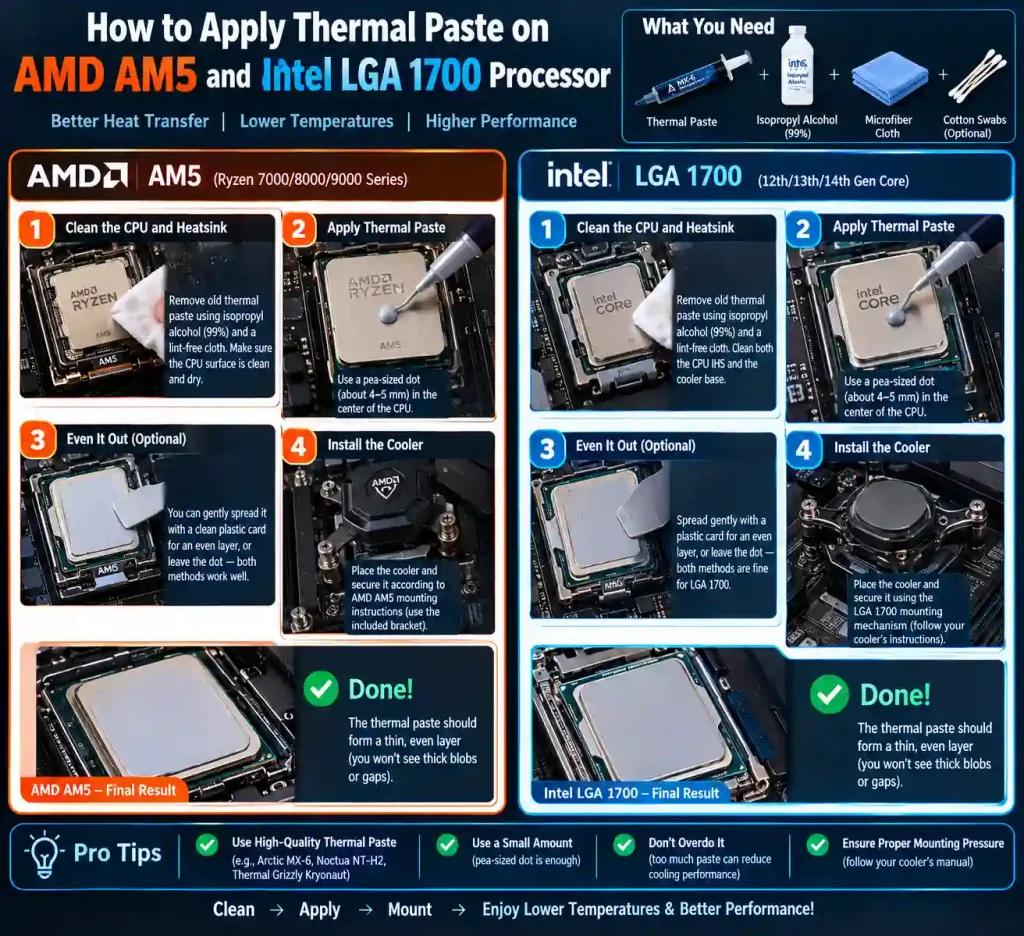
How to Apply Thermal Paste on CPU (Socket-by-Socket Guide)
Applying thermal paste incorrectly can create trapped air pockets or leave die corners uncooled. While many patterns exist, modern testing shows that the cooler’s mounting pressure does most of the spreading work:
- 1. Pea-Sized Dot (Center): Best for small or older square processors (AM4, LGA 1200). Place a single 5mm drop in the center. Clamping pressure flattens it outward into an even circle.
- 2. Cross Pattern (X): The gold standard for modern high-performance builds. Draw a thin “X” across the lid (stopping just short of the edges) to guarantee coverage across wide, multi-chiplet dies.
- 3. Vertical Line Method: A single thin stripe down the center third of the heatspreader. Perfect for elongated rectangular chips like Intel LGA 1700 and LGA 1851.
- 4. Five-Dot Pattern: One dot in the center and four tiny dots near the corners. Great for larger square heatspreaders.
- 5. Manual Spatula Spread: Manually spreading a paper-thin layer across the entire lid using a plastic spreader. Best for direct-die laptop repasting.
Step-by-Step Socket Guidance:
- AMD Socket AM5 (Ryzen 7000/9000): Place a single 5mm pea dot in the center, or a tiny thin “X”. Keep compound away from the side notches where surface-mounted capacitors reside. Lower the cooler straight down and tighten screws diagonally.
- Intel LGA 1700 / LGA 1851: Because the chip is a tall rectangle (37.5mm × 45mm), a center dot leaves top and bottom corners bare. Apply a thin vertical line down the middle third, or an elongated thin “X”.
- Gaming Laptops & Handhelds: Cut Honeywell PTM7950 to the exact size of the silicon die, peel the backing, and seat the copper cold plate flat against the surface.
💡 Quick Answer:
For square AMD sockets, apply a 5mm pea-sized dot in the center. For elongated Intel LGA 1700/1851 sockets, draw a thin line or elongated ‘X’. The cooler’s mounting pressure will automatically spread the compound across the entire lid.
How to Safely Clean Old Thermal Paste (Step-by-Step)
If you are upgrading your cooler or repasting an existing build, cleaning old, dried-out compound properly is essential:
- Step 1: Warm Up the System: Run a quick 5-minute benchmark before opening your case. Cold paste acts like glue and can physically rip AMD processors out of their sockets, bending pins.
- Step 2: The Gentle Twist Technique: Unscrew the mounting bracket and gently twist the cooler clockwise and counter-clockwise to break the suction seal. Never pull straight up with force.
- Step 3: Wipe with 90%+ Isopropyl Alcohol (IPA): Moisten a coffee filter or microfiber cloth with 90%+ IPA. Coffee filters are 100% lint-free and will not shed paper fibers into your socket.
- Step 4: Dry and Inspect: Wipe from the outer edges inward to keep old compound away from motherboard traces. Let dry for 60 seconds before applying fresh paste.
💡 Quick Answer:
Warm up your processor for 5 minutes, turn off the PC, gently twist the cooler to break the suction seal, and wipe the surfaces clean using 90%+ Isopropyl Alcohol and a lint-free coffee filter.
Critical Pro-Tips to Avoid Thermal Paste Disasters
- Peel the Cooler Plastic Sticker: Always check the copper baseplate of your new cooler. Forgetting to peel off the clear plastic protective sticker is the #1 cause of immediate 100°C thermal throttling.
- Too Much vs. Too Little: Using slightly too much non-conductive paste only causes messy cleanup around the socket edges. However, using too little paste leaves uncooled dry spots, causing instant overheating.
- Never Reuse Paste: If you lift the cooler after seating it, air pockets enter the compound. You must wipe it clean with alcohol and reapply fresh paste every single time.
- Tighten Diagonally: Always tighten cooler screws in an alternating “X” pattern, two turns each, to ensure perfectly even clamping pressure across the IHS.
💡 Quick Answer:
Always remove the clear plastic sticker from the cooler base, tighten mounting screws diagonally in an “X” pattern, and never reuse old thermal paste after unseating a cooler.
How Often Should You Replace Your CPU Thermal Paste?
Thermal paste degradation depends on the quality of the compound and how heavily your system is utilized:
| Platform | Recommended Interval | Warning Sign to Repaste |
|---|---|---|
| Desktop PC (Standard Paste) | Every 4 to 6 Years | Idle temperatures rise from 35°C to 50°C+; loud fan noise at idle. |
| Heavy Overclocking (Kryonaut) | Every 12 to 18 Months | Sudden temperature spikes exceeding 90°C during routine gaming. |
| Gaming Laptops (Standard Paste) | Every 1 to 2 Years | Immediate 95°C–100°C throttling and severe frame stuttering. |
| Gaming Laptops (Honeywell PTM7950) | Every 5 to 7 Years | Rarely degrades; virtually maintenance-free. |
💡 Quick Answer:
Repaste desktop gaming PCs every 4 to 5 years under normal use. For gaming laptops or overclocked systems running sustained loads above 85°C, replace your thermal paste every 12 to 18 months.
Sources: ARCTIC – MX-6 product page; Thermal Grizzly – Kryonaut product page.
Frequently Asked Questions (FAQ)
Does thermal paste expire in the tube if unopened?
Unopened thermal paste stored in a cool, dry place lasts 5 to 8 years. If paste squirts out as watery, separated liquid followed by hard chalky lumps, the formula has separated and should be discarded.
Is Honeywell PTM7950 better than regular thermal paste?
For desktop CPUs with a metal lid, high-grade paste performs similarly to PTM7950. However, for gaming laptops, handheld PCs, and direct-die cooling, PTM7950 is far superior because it eliminates the pump-out effect and never dries out.
Can replacing thermal paste improve gaming FPS?
Yes, if your CPU is currently thermal throttling. Replacing old, dried-out paste drops temperatures, allowing your CPU to sustain its highest boost clock speeds without downclocking, which eliminates stuttering and restores peak frame rates.
Can I use 70% rubbing alcohol to clean CPU paste?
Avoid 70% rubbing alcohol. It contains 30% water and residual oils that do not evaporate quickly and can leave conductive deposits behind. Always use 90% to 99% Isopropyl Alcohol (IPA) or specialized electronic cleaners.
What happens if thermal paste spills onto the motherboard?
If the paste is non-conductive and dielectric (like Arctic MX-6 or Noctua NT-H2), it will not cause a short circuit or damage components. Simply clean the excess gently using a soft toothbrush dampened with 90%+ Isopropyl Alcohol.
How do I tell if low FPS is caused by thermal paste or a hardware bottleneck?
Use our free Bottleneck Calculator to analyze your CPU and GPU pairing. If the calculator confirms your components are balanced, but your gaming hardware hits 95°C–100°C with low GPU utilization, your system is suffering from a thermal bottleneck caused by degraded thermal paste.
Final Verdict: Which Thermal Paste Should You Choose in 2026?
- Best for 90% of Desktop Gamers: Choose ARCTIC MX-6 for top-tier cooling, an 8-year lifespan, and zero risk of electrical shorts.
- Best for Easy Application: Choose Noctua NT-H2 for smooth spreading and included cleaning wipes.
- Best for Gaming Laptops & Handhelds: Choose Honeywell PTM7950 to permanently eliminate pump-out.
- Best for Sub-80°C Overclocking: Stick with Thermal Grizzly Kryonaut.
Once your temperatures are under control and your CPU is boosting to its full potential, run your hardware through the Bottleneck Calculator to confirm your PC is running at peak, balanced gaming performance!