
RTX 5060 Ti vs GTX 1660 Super: Is the Upgrade Worth It?
Short answer: The RTX 5060 Ti 16GB is about 192% faster at 1440p across nine demanding games (86 vs 29 FPS on High). At 1080p the RTX 5060 Ti 16GB is about 161% faster, and at 4K the RTX 5060 Ti 16GB is about 216% faster. The RTX 5060 Ti 16GB has more video memory (16 GB vs 6 GB), which matters at 1440p and with high textures. The GTX 1660 Super uses about 55 W less power.
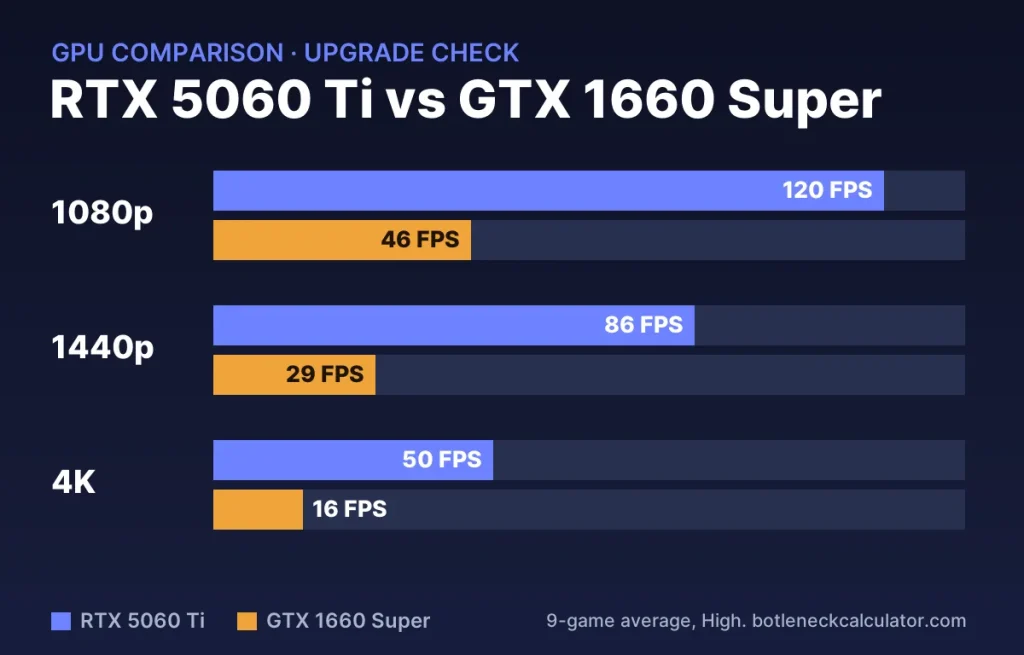
| RTX 5060 Ti 16GB | GTX 1660 Super | |
|---|---|---|
| Average FPS, 1080p High | 120 | 46 |
| Average FPS, 1440p High | 86 | 29 |
| Average FPS, 4K High | 50 | 16 |
| Cyberpunk 2077, 1440p Ultra + ray tracing | 42 FPS | No RT hardware |
| Video memory | 16 GB GDDR7 | 6 GB GDDR6 |
| Board power | 180 W | 125 W |
| FPS per 100 W (1440p) | 47.7 | 23.5 |
Table of ContentsShow or hide all 6 sectionsShowHide
RTX 5060 Ti 16GB vs GTX 1660 Super FPS in popular games
| Game | RTX 5060 Ti 16GB 1080p | GTX 1660 Super 1080p | RTX 5060 Ti 16GB 1440p | GTX 1660 Super 1440p |
|---|---|---|---|---|
| Counter-Strike 2 | 387 | 160 | 276 | 115 |
| Valorant | 527 | 219 | 377 | 156 |
| Fortnite | 164 | 68 | 117 | 49 |
| Call of Duty: Black Ops 7 | 115 | 39 | 82 | 21 |
| Battlefield 6 | 129 | 44 | 92 | 31 |
| ARC Raiders | 141 | 58 | 100 | 34 |
| Marvel Rivals | 100 | 41 | 71 | 24 |
| Cyberpunk 2077 | 111 | 38 | 80 | 27 |
| Black Myth: Wukong | 76 | 32 | 54 | 19 |
| Hogwarts Legacy | 105 | 36 | 75 | 26 |
| Baldur's Gate 3 | 141 | 58 | 100 | 34 |
| Elden Ring | 60 | 46 | 60 | 33 |
Specs compared
| Spec | RTX 5060 Ti 16GB | GTX 1660 Super |
|---|---|---|
| Architecture | Blackwell | Turing |
| Release year | 2025 | 2019 |
| Video memory | 16 GB GDDR7 | 6 GB GDDR6 |
| Board power | 180 W | 125 W |
| Upscaling and frame generation | DLSS 4 with Multi Frame Generation (up to 4x, 6x with DLSS 4.5) | FSR and XeSS only (no DLSS, no hardware ray tracing) |
| Ray tracing speed kept | 64% of raster FPS | 0% of raster FPS |
| Suggested power supply | 500 W | 450 W |
Which CPU do they need?
| Processor | RTX 5060 Ti 16GB (1080p / 1440p) | GTX 1660 Super (1080p / 1440p) |
|---|---|---|
| Ryzen 5 5600 | 26% CPU / 11% CPU | 15% GPU / 29% GPU |
| Core i5-12400F | 27% CPU / 13% CPU | 13% GPU / 28% GPU |
| Ryzen 5 7600 | 17% CPU / 2% GPU | 24% GPU / 35% GPU |
| Ryzen 7 7800X3D | 7% CPU / 13% GPU | 31% GPU / 40% GPU |
Full lists: best CPU for the RTX 5060 Ti 16GB and best CPU for the GTX 1660 Super.
Upgrading from a GTX 1660 Super
The GTX 1660 Super came out in 2019. It has no ray tracing hardware, no DLSS and only 6 GB of video memory. In our nine-game average the RTX 5060 Ti 16GB gets about 2.6 times the FPS at 1080p and 2.9 times at 1440p, and it adds DLSS 4 with Multi Frame Generation. Before you buy, check three things:
- Power supply. The RTX 5060 Ti draws about 180 W, 55 W more than the GTX 1660 Super, and most models use one 8-pin power connector. Corsair lists 500 W as the required system power, so a good 500–550 W unit is enough for most builds. Our PSU calculator adds extra headroom.
- Processor. Many GTX 1660 Super systems have a six-core CPU from 2018–2020. These hold the RTX 5060 Ti back at 1080p (see the table below), but much less at 1440p.
- PCIe slot. The RTX 5060 Ti uses eight PCIe lanes. On older PCIe 3.0 motherboards, such as B450 or Intel 400-series boards, it loses a little performance. The 16 GB model is affected less than the 8 GB model, because it rarely runs out of video memory.
| Processor | RTX 5060 Ti bottleneck, 1080p | RTX 5060 Ti bottleneck, 1440p |
|---|---|---|
| Ryzen 5 2600 | 42% CPU | 34% CPU |
| Ryzen 5 3600 | 33% CPU | 20% CPU |
| Core i5-9400F | 38% CPU | 27% CPU |
| Core i5-10400F | 34% CPU | 23% CPU |
| Ryzen 5 5600 | 26% CPU | 11% CPU |
Choose the 16 GB version if you can: the 8 GB RTX 5060 Ti runs out of video memory in several new games at 1440p and with high textures. See the best CPU for the RTX 5060 Ti for a processor that keeps it fully busy.
Which one should you buy?
- Buy the RTX 5060 Ti 16GB if you want the most raw FPS at 1440p, you want more video memory for high textures and future games, you play with ray tracing on or you want Multi Frame Generation for high-refresh monitors.
- Buy the GTX 1660 Super if you want lower power draw and a smaller power supply.
Prices change week to week, so compare the cost per frame: divide the price by the 1440p average above. A card that is 10% faster is only worth up to about 10% more money.
Frequently asked questions
Is the RTX 5060 Ti 16GB better than the GTX 1660 Super?
For gaming at 1440p, the RTX 5060 Ti 16GB is about 192% faster in our nine-game average (86 vs 29 FPS).
How much faster is the RTX 5060 Ti 16GB?
About 161% at 1080p, 192% at 1440p and 216% at 4K on High settings, native resolution.
Which one is better for ray tracing?
Only one of these cards has hardware ray tracing, so it is the clear choice for ray-traced games.
Is 8 GB of VRAM enough in 2026?
For 1080p on High in most games, yes. At 1440p, with Ultra textures or ray tracing, several new games need more than 8 GB, which causes stutter. 12–16 GB is the safer choice.
Is the RTX 5060 Ti a good upgrade from a GTX 1660 Super?
Yes. In our model it gives about 2.6 times the FPS at 1080p and 2.9 times at 1440p, adds ray tracing and DLSS 4, and has 16 GB instead of 6 GB of video memory. Check your power supply and processor first.
Do I need a new power supply for the RTX 5060 Ti?
Usually not, if you have a good 500–550 W unit with an 8-pin PCIe power connector. The card draws about 180 W.
More comparisons
Sources: Tom’s Hardware GPU hierarchy, Tom’s Hardware CPU hierarchy, TechSpot CPU and GPU scaling tests, TechPowerUp GPU database, and manufacturer specifications from AMD, Intel and NVIDIA. Bottleneck and FPS figures come from our own bottleneck and FPS models.