GPU Benchmarks 2026: The Complete Guide to Reading, Comparing and Trusting the Numbers
Every year the same problem repeats itself: a new GPU launches, benchmark charts flood the internet, and buyers are left more confused than informed. One site shows a graphics card crushing the competition; another shows it barely ahead. The hardware didn’t change the testing conditions did.
This guide breaks down how GPU benchmarks actually work in 2026, why raw FPS numbers can mislead you, and how to use benchmark data the right way when picking your next graphics card.
Table of ContentsShow or hide all 14 sectionsShowHide
Why GPU Benchmark Results Are Rarely What They Seem
A benchmark number is a snapshot of one specific system: one CPU, one resolution, one driver version, one game build. Change any of those variables and the result shifts sometimes dramatically.
This is why the same GPU can appear “excellent” on one review site and “average” on another. Neither number is wrong; they’re just answering different questions. The real skill isn’t finding the highest FPS chart it’s understanding what conditions produced that number, and whether those conditions match your own setup.
Three variables matter more than any others:
- Resolution determines whether the CPU or the GPU is doing most of the work
- CPU pairing a mismatched CPU can hide a GPU’s true performance
- Workload type gaming, content creation, and AI tasks stress a GPU in completely different ways
GPU Benchmarks by Resolution: What Actually Changes
1080p: Where CPU Bottlenecks Hide the Truth
At 1080p, most modern GPUs are held back by the CPU long before they run out of graphical headroom especially in competitive titles. This is the resolution where flagship and mid-range cards often post surprisingly similar numbers, not because the GPUs are equal, but because the processor can’t feed frames fast enough to show the difference.
If you’re benchmarking or reading benchmarks at 1080p, treat the results as a CPU performance test wearing a GPU’s name tag.
1440p: The Resolution Where Benchmarks Get Honest
Once you move to 1440p, the workload shifts back toward the GPU, and benchmark charts start reflecting real hardware differences again. This is generally considered the most reliable resolution for comparing mid-range and upper-mid-range cards, since CPU bottlenecks are less likely to mask performance gaps.
4K: Where Marketing Claims Meet Reality
At native 4K, CPU influence mostly disappears, and a GPU’s raw rendering strength — VRAM capacity, memory bandwidth, and core architecture becomes the deciding factor. This is also where the gap between “benchmark average” and “actual gameplay feel” becomes obvious: a card that looks fine on paper can still show inconsistent frame delivery once scenes get demanding.
Real 2026 Flagship Benchmark Data (From Independent Reviews)
Most GPU benchmark roundups online recycle the same unverified numbers. The figures below come from named independent reviews, each linked under the table, so you can check every number yourself. We do not run our own lab tests.
| Matchup | 1440p | 4K | What the reviews found |
|---|---|---|---|
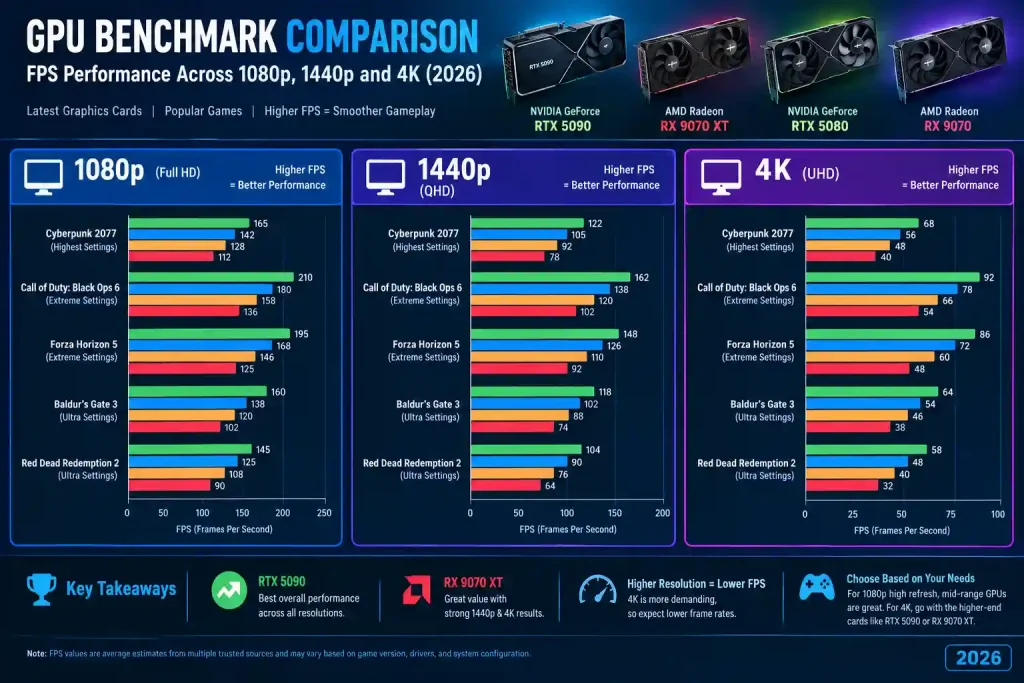
| RTX 5090 vs RTX 4090 | About 12% faster (17-game average) | About 27% faster (17-game average) | TechSpot measured a 17% average gain with ray tracing at 1440p. The bigger the resolution, the bigger the gap, because at 1440p the CPU often limits both cards. |
| RTX 5070 Ti vs RX 9070 XT | About 1% faster for the 5070 Ti (52 games) | About 4% faster for the 5070 Ti (52 games) | Effectively tied overall. PCWorld put the 5070 Ti 3–6% ahead. The 5070 Ti pulls well ahead in heavy ray tracing, so price usually decides. |
| RTX 5080 vs RX 9070 XT | RTX 5080 ahead (17% in Black Myth: Wukong) | RTX 5080 ahead | The 9070 XT competes with the 5070 Ti rather than the 5080. Gamers Nexus found the 9070 XT behind the 5070 Ti by 16–78% in heavy ray-traced games. |
A few honest takeaways from this data that most “listicle” benchmark pages won’t tell you:
- The RTX 5090’s gain over the RTX 4090 depends on resolution. TechSpot measured about 12% at 1440p but 27% at 4K, because at lower resolutions the CPU becomes the limit for both cards.
- The RX 9070 XT is a true RTX 5070 Ti rival in raster games. Across 52 games TechSpot found the two effectively tied, which makes price the deciding factor for most buyers.
- Ray tracing is where the real separation happens. In heavy ray-traced games such as Black Myth: Wukong and Cyberpunk 2077 with RT Ultra, Gamers Nexus measured NVIDIA’s lead over the 9070 XT growing far beyond the small raster gap.
Note: exact FPS numbers shift with driver versions, game patches and test-suite selection, so treat any single benchmark chart (including this one) as a directional guide. Cross-reference multiple sources before buying.
Ray Tracing Benchmarks: A Different Kind of Test
Ray tracing simulates how light actually behaves reflections, shadows, and refractions calculated in real time rather than faked with traditional rasterization tricks. It looks better, but it’s also far more demanding.
A few practical rules for judging RT benchmarks in 2026:
- 1080p ray tracing results are still frequently CPU-limited, so treat them cautiously
- 1440p is where RT benchmarks start to separate GPU tiers meaningfully
- 4K ray tracing is the real stress test this is where VRAM bandwidth and dedicated RT hardware generation matter most
If a GPU needs upscaling just to stay playable with ray tracing on, that tells you more about its actual RT capability than any single average-FPS number.
Benchmarks for Content Creation and AI Workloads
Gaming benchmarks and productivity benchmarks measure completely different things, and using one to judge the other is a common buying mistake.
- Video editing performance leans heavily on encoder/decoder acceleration and driver maturity, not just raw compute power
- 3D rendering (Blender, Unreal path tracing) scales closely with VRAM size and core count
- AI/ML workloads are dominated by VRAM capacity and software ecosystem support a GPU with excellent gaming scores can still underperform here if it’s short on memory
If your work involves any of these tasks, don’t rely on a general “GPU benchmark list” look specifically for task-based benchmarks that match your workflow.
VRAM and Bandwidth: The Quiet Bottleneck
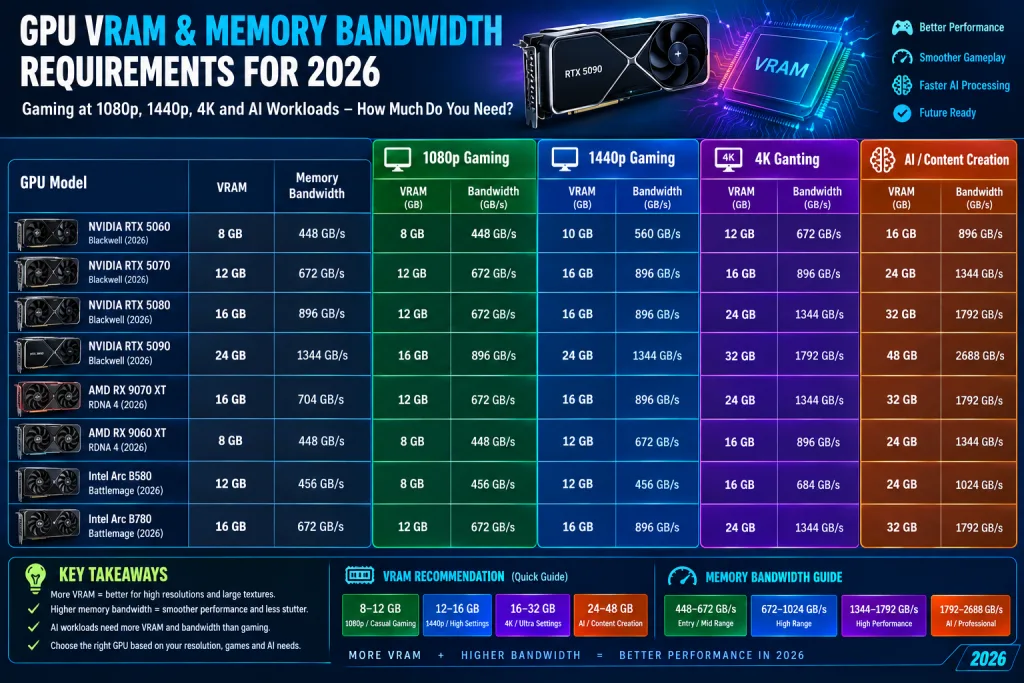
VRAM capacity gets attention, but bandwidth matters just as much. A GPU can have “enough” memory on paper and still choke if that memory can’t be read and written fast enough for the resolution or workload you’re running.
As a rough guide for 2026:
| Use Case | Practical VRAM Guidance |
|---|---|
| 1080p esports/competitive | 8GB is often still workable |
| 1440p AAA gaming | 12–16GB recommended |
| 4K gaming | 16GB+ strongly recommended |
| AI/ML or large 3D scenes | 16–24GB+ depending on model size |
When a GPU runs out of VRAM mid-game, the result isn’t a gradual slowdown it’s a sudden, sharp frame-rate dip. That’s often the real cause behind “why does my benchmark score look fine but the game still stutters?”
Laptop GPU Benchmarks: Why They Never Match Desktop Numbers
A laptop GPU sharing the same model name as its desktop counterpart is not the same chip in practice. Power limits, thinner cooling, and reduced clock speeds mean laptop variants routinely deliver noticeably less performance than desktop cards with an identical name.
Real-world testing on flagship laptop GPUs backs this up clearly:
- Even a top-tier mobile flagship struggles to hold a steady 60 FPS at 4K in the most demanding titles without upscaling averaging closer to the mid-60s FPS range across a wide game selection
- Enabling frame-generation upscaling can push that same laptop into the 100–120 FPS range at 4K, which is often the only realistic way to get smooth 4K gameplay on a laptop
- At 1440p in esports titles, high-end gaming laptops can comfortably exceed 300 FPS, making them genuinely capable for competitive gaming despite the weaker 4K story
- Generational gains on laptops are often smaller than on desktop some independent testing found only a 0–3% average improvement between consecutive laptop GPU generations at 1440p and 4K, with the bigger real-world wins coming from power efficiency and battery life rather than raw FPS
Takeaway: never assume a laptop GPU will perform like its desktop namesake. Always look for laptop-specific benchmarks, and pay attention to the wattage (TGP) a manufacturer has configured for that specific model the same GPU chip can behave very differently at 80W versus 150W.
GPU Power Supply (PSU) Requirements: Don’t Get This Wrong
Undersizing your PSU is one of the most common and most avoidable mistakes when upgrading a GPU. As a general framework for 2026 GPUs:
| GPU Tier | Typical Board Power | Recommended PSU (with a mid-range CPU) |
|---|---|---|
| Entry-level (1080p) | 115–170W | 500–550W |
| Mid-range (1440p) | 200–260W | 600–650W |
| High-end (1440p/4K) | 260–320W | 700–750W |
| Flagship (4K) | 320–450W | 850–1000W |
| Enthusiast flagship (4K/8K) | 450–575W | 1000W+ |
A few practical PSU rules that matter more than the wattage number alone:
- Check the connector, not just the wattage. Newer flagship GPUs use 16-pin power connectors (12V-2×6); make sure your PSU either has one natively or comes with a proper adapter don’t improvise with cheap third-party cables.
- Buy 100–200W above your calculated need. This gives headroom for transient power spikes, which modern GPUs are prone to under load, and leaves room for future upgrades.
- Prioritize efficiency and brand reliability (80+ Gold or better from established manufacturers) over squeezing out the cheapest wattage rating a flagship GPU pulling spiky loads through a bargain PSU is a common cause of random shutdowns.
Choosing a GPU by Workload (Not Just by Game)
Different tasks stress different parts of a GPU, so “best GPU” always depends on what you’re actually doing with it:
- Streaming and recording: prioritize a GPU with a strong dedicated hardware encoder this affects stream quality and CPU load far more than raw gaming FPS does.
- Content creation (Blender, Premiere, DaVinci Resolve): VRAM capacity and acceleration API support (like OptiX-style acceleration) usually matter more than a card’s gaming benchmark score.
- AI image/video generation (Stable Diffusion and similar tools): VRAM is the single biggest factor a GPU with more memory will often outperform a “faster” GPU with less VRAM once you’re working with larger models or batch sizes.
- Competitive esports: almost any modern mid-range GPU is sufficient; your CPU and monitor refresh rate matter more than the GPU tier at this point.
If you’re not sure where your current setup falls short, running your CPU and GPU pairing through a PC bottleneck calculator takes less time than reading a full review and tells you exactly which part of your system is holding the other back.
How to Actually Use Benchmark Data When Buying
Instead of chasing the single highest number in a chart, use benchmarks the way they’re meant to be used:
- Compare within your resolution a 4K benchmark tells you little about 1080p performance and vice versa
- Match the GPU to your workload gaming, creative work, and AI each need different strengths
- Check VRAM against your actual use case, not just against other GPUs
- Account for your CPU a benchmark chart assumes a specific CPU pairing; yours may bottleneck differently
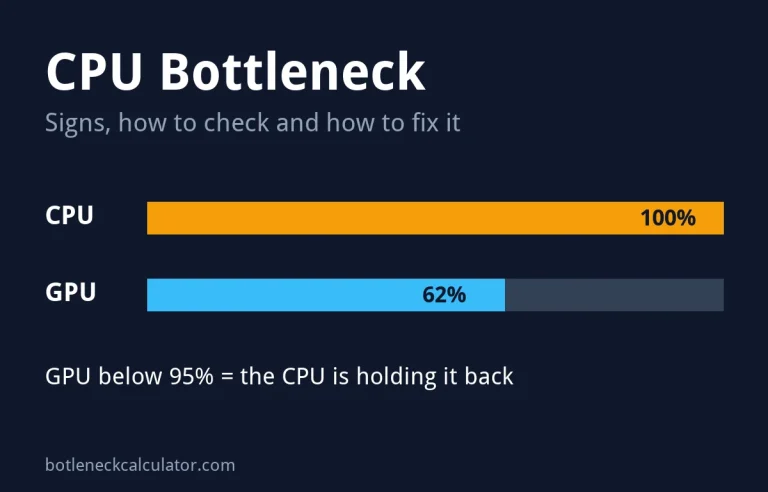
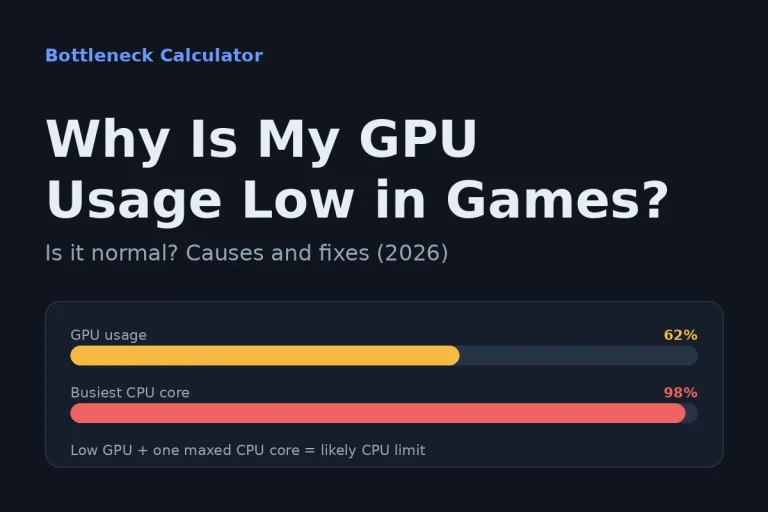
This last point is where most buyers go wrong. A GPU can be objectively excellent in every review and still underperform in your PC simply because your CPU can’t keep up. Before spending money on an upgrade, it’s worth quickly checking whether your current CPU is actually the limiting factor a free PC bottleneck calculator can show you this in seconds by comparing your CPU and GPU pairing at your target resolution, so you know whether a new graphics card will actually deliver the gains the benchmarks promise.
GPU Size and Case Compatibility
Flagship and high-end GPUs in 2026 are physically large, and this trips up more buyers than you’d expect. Before ordering a GPU, check three measurements against your case’s official specs sheet rather than guessing from the box photo:
- Length flagship triple-fan cards commonly exceed 320–350mm; measure your case’s GPU clearance, not just “it looked big enough”
- Slot width many current-gen cards take up 3 to 3.5 PCIe slots, which can block adjacent expansion slots or affect airflow
- Height/thickness with the side panel on this is the most commonly overlooked measurement, especially in smaller cases
As a rough sizing guide: Mini-ITX cases generally top out around 270–300mm of GPU clearance, Micro-ATX cases handle most mid-range cards up to roughly 320mm, and full mid-tower or full-tower ATX cases comfortably fit anything on the market today. Always confirm against the exact AIB (board partner) model you’re buying, since the same GPU chip can ship in very different card sizes depending on the manufacturer’s cooler design.
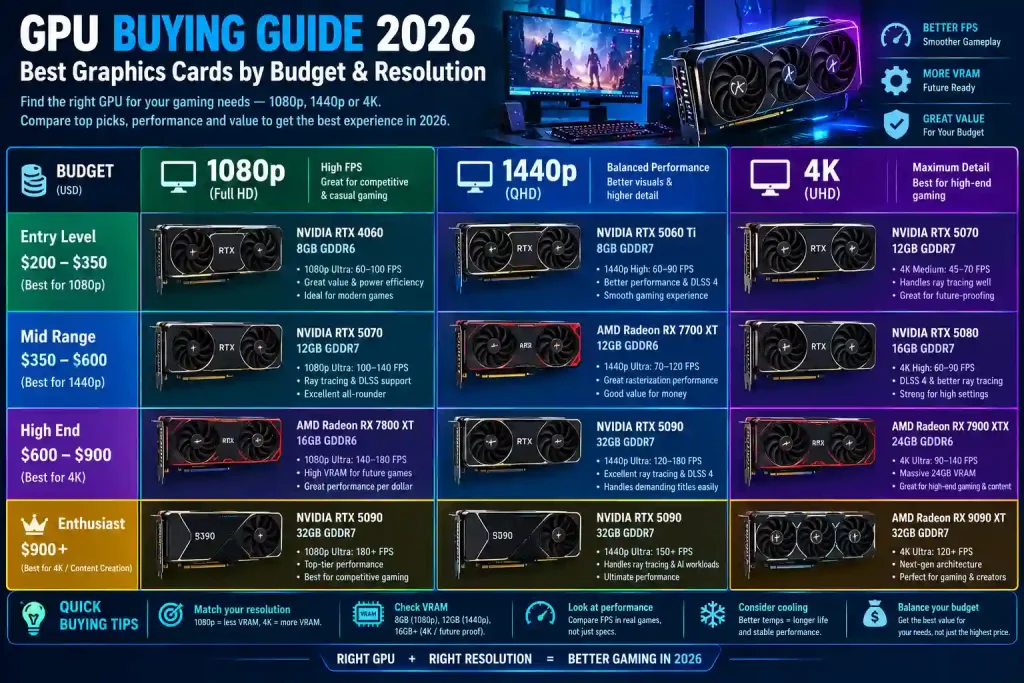
GPU Buying Guide 2026 (Quick Reference)
1080p Gaming
- Budget: entry-level current-gen cards from NVIDIA, AMD, or Intel
- High refresh / competitive: mid-range cards with strong single-threaded CPU pairing
1440p Gaming
- Sweet spot for most gamers in 2026 balances price and longevity
- Look for 12–16GB VRAM and solid 1440p benchmark consistency, not just averages
4K Gaming
- Requires high-end cards with strong memory bandwidth
- Upscaling (DLSS/FSR) is often necessary even on flagship cards for demanding titles
Content Creation / AI
- Prioritize VRAM and software ecosystem support over gaming benchmark scores
- Check task-specific benchmarks (rendering, encoding, model size) rather than generic GPU rankings
Frequently Asked Questions
What are GPU benchmarks?
GPU benchmarks are standardized tests that measure a graphics card’s performance in specific games or workloads, usually reported as average FPS, frame-time consistency, or workload-specific scores.
Why do GPU benchmark results differ between websites?
Because testing conditions differ CPU, resolution, driver version, game build, and even background system load all affect the final numbers.
What resolution should I compare GPU benchmarks at?
Compare at the resolution you’ll actually game at. 1080p results are often CPU-limited, so 1440p and 4K benchmarks are more representative of a GPU’s true power.
How much VRAM do I need for modern gaming in 2026?
8GB can still work for 1080p esports titles, but 12–16GB is increasingly recommended for 1440p, and 16GB+ for 4K or AI/creative workloads.
Why is my FPS low even though my GPU has strong benchmark scores?
This is usually a bottleneck elsewhere in the system most commonly the CPU, but also insufficient VRAM, outdated drivers, or background processes. Checking your specific CPU-GPU pairing against your target resolution is the fastest way to diagnose this.
Should I trust a single benchmark chart when buying a GPU?
Use it as one data point, not the final word. Cross-check against multiple sources and, where possible, against a workload similar to your own use case.
Final Thoughts
GPU benchmarks are genuinely useful but only when read in context. A number without its testing conditions is just noise. Understand the resolution, the CPU pairing, and the workload behind a benchmark, and you’ll make far better upgrade decisions than someone chasing the top of a leaderboard.