Does PCIe 3.0 Bottleneck Your GPU? PCIe 3.0 vs 4.0 vs 5.0 for Gaming
Many gaming PCs still run on a PCIe 3.0 motherboard: older Intel boards, AMD B450 and A520 boards, and some budget Ryzen chips. New graphics cards are built for PCIe 4.0 or 5.0, so does putting one in an older slot hold it back? It depends far more on the card than on the slot. This guide shows real test results, explains when PCIe 3.0 becomes a bottleneck, and lists which cards to avoid on older boards.
Quick answer: For a graphics card with 16 PCIe lanes and enough video memory, PCIe 3.0 costs only a few percent. TechPowerUp measured the RTX 5090 at about 4% slower on PCIe 3.0 x16 than on PCIe 5.0 at 1080p, and about 1% slower on PCIe 4.0. The real problem is budget cards that use only 8 lanes and have 8 GB of VRAM, such as the RTX 5060 Ti 8GB. When a game runs out of VRAM, those cards lean on the PCIe link, and on PCIe 3.0 they can lose half their performance or more. On an older board, choose a 16 GB card or one with a full x16 connection.
Table of ContentsShow or hide all 7 sectionsShowHide
What does PCIe do for your graphics card?
PCI Express (PCIe) is the link between your graphics card and the rest of the PC. The CPU uses it to send draw commands, textures and game data to the card. Each new PCIe generation doubles the bandwidth per lane, and a graphics card uses either 16, 8 or 4 lanes.
Each PCIe generation doubles the bandwidth per lane. A card with 8 lanes on PCIe 3.0 gets a quarter of what it gets on PCIe 5.0.
Show all results as a table
| Link | Approx. bandwidth (each direction) |
|---|---|
| PCIe 5.0 x16 | about 63 GB/s |
| PCIe 4.0 x16 / PCIe 5.0 x8 | about 32 GB/s |
| PCIe 3.0 x16 / PCIe 4.0 x8 | about 16 GB/s |
| PCIe 3.0 x8 / PCIe 4.0 x4 | about 8 GB/s |
| PCIe 3.0 x4 | about 4 GB/s |
Your graphics card does not need much of this bandwidth while everything fits in its own video memory (VRAM). The link matters most when the card runs out of VRAM and has to fetch data from system RAM over PCIe, which is far slower than its own memory.
PCIe 3.0 vs 4.0 vs 5.0 with a high-end card
TechPowerUp tested the RTX 5090, the fastest gaming card available, on every PCIe setting. Even this card barely notices a slower full-width slot:
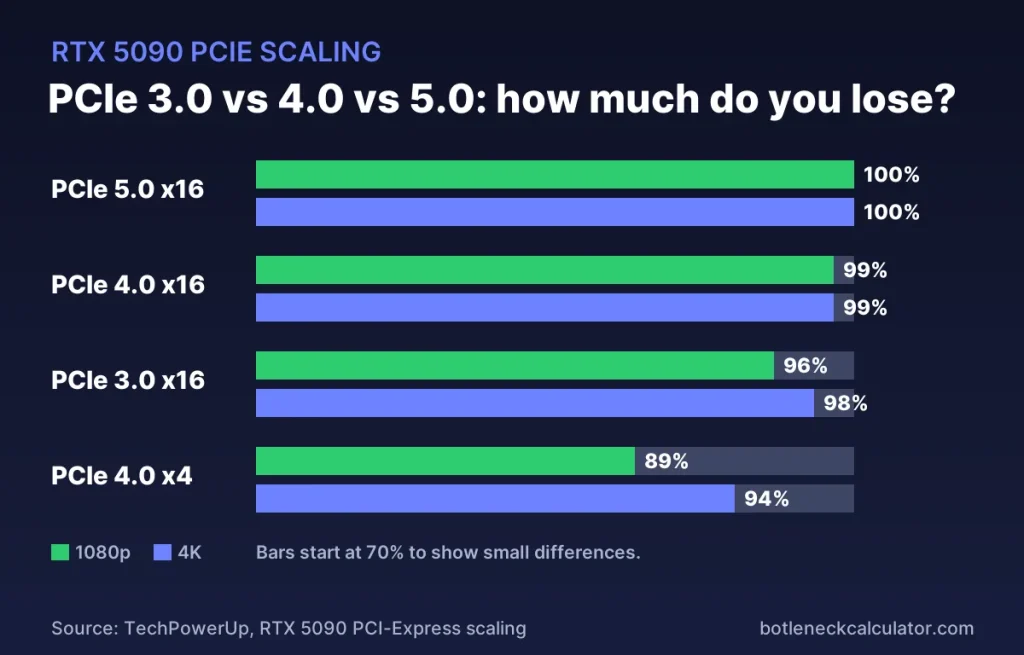
- PCIe 4.0 x16: about 1% slower than PCIe 5.0. TechPowerUp’s verdict: on a Gen 4 x16 platform “you lose close to nothing”.
- PCIe 3.0 x16: about 4% slower at 1080p and 1440p, and about 2% at 4K. Hard to notice while playing.
- PCIe 4.0 x4 (for example, a card plugged into the lower, chipset slot): about 10% slower at 1080p. Always use the top x16 slot.
So if you own a high-end card with 16 lanes and plenty of VRAM, an older PCIe 3.0 board is not a reason to upgrade. Your CPU is far more likely to hold that card back. Check your pair in the bottleneck calculator.
The real problem: 8 GB cards with 8 lanes
Many budget cards use only 8 PCIe lanes to save cost. On PCIe 5.0 or 4.0 that is enough, but on PCIe 3.0 an x8 card gets just 8 GB/s. If the card also has only 8 GB of VRAM, modern games that need more memory spill over the PCIe link, and performance collapses.
TechSpot tested the RTX 5060 Ti 8GB, an x8 card, on PCIe 5.0, 4.0 and 3.0 against the 16 GB model:
- In Spider-Man 2, the 16 GB card was 120% faster than the 8 GB card on PCIe 5.0, 210% faster on PCIe 4.0 and 592% faster on PCIe 3.0.
- In The Last of Us Part II, the 8 GB card matched the 16 GB card on PCIe 5.0, but fell 40% behind on PCIe 3.0.
- In Dragon Age: The Veilguard, the 8 GB card averaged 27 FPS on PCIe 3.0 against 66 FPS for the 16 GB card.
The same happens with an x16 card once VRAM runs out. TechSpot’s RX 9060 XT tests showed the 8 GB model trailing the 16 GB model by about 20% on PCIe 5.0, about 38% on PCIe 4.0 and about 53% on PCIe 3.0 across the demanding games tested. In Indiana Jones and the Great Circle the 8 GB card managed 45 FPS on PCIe 3.0 against 135 FPS for the 16 GB card. TechSpot called the 8 GB model “effectively unusable when limited to PCIe 3.0” in nearly all of those games.
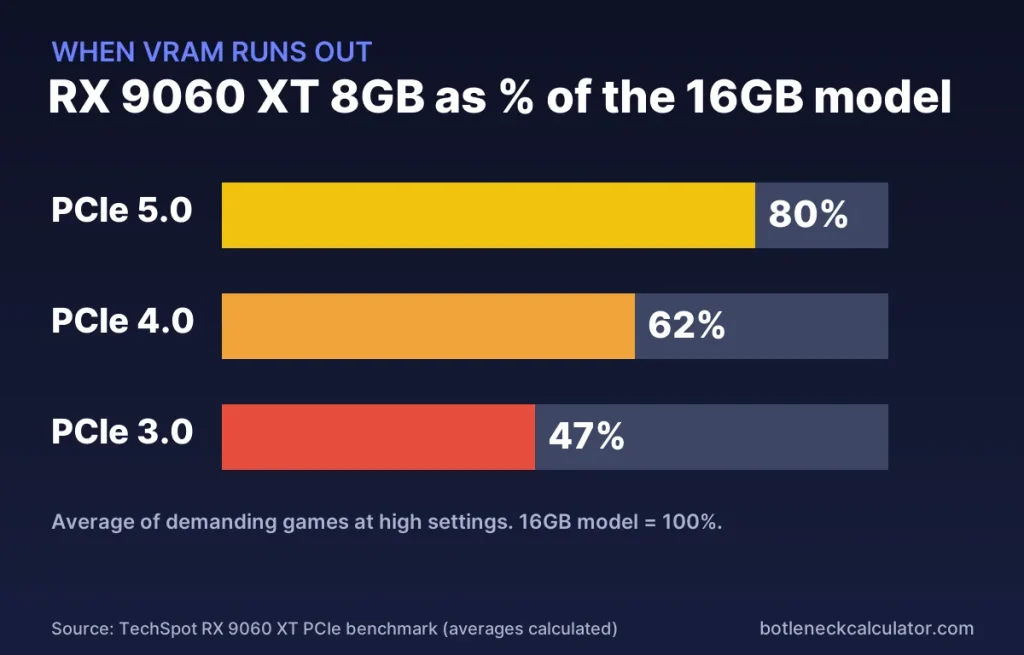
These are worst-case tests at high settings in VRAM-hungry games. At lower texture settings, or in lighter esports games, an 8 GB card often stays within its memory and PCIe matters much less. But you have less control over that in future games. Read how much VRAM you need for gaming for current recommendations.
Is my motherboard PCIe 3.0?
Both the CPU and the motherboard must support a PCIe generation. Common setups that run the graphics card at PCIe 3.0:
- AMD B450, X470 and A520 boards, even with a Ryzen 5000 CPU.
- Ryzen 5 5500, Ryzen 5 5600G and Ryzen 7 5700G, which only support PCIe 3.0 even on a B550 board.
- Intel 10th Gen and older (Core i5-10400F and earlier) on 400-series boards.
- Ryzen 3000-series CPUs on B450 (only X570 and B550 boards enable PCIe 4.0 for them).
To check yours, open GPU-Z and look at the Bus Interface field. Run a game or GPU-Z’s render test, because the link drops to a lower speed at idle to save power. A reading such as “PCIe x16 4.0 @ x8 3.0” means an x8 card running at PCIe 3.0.
Which graphics cards should you avoid on PCIe 3.0?
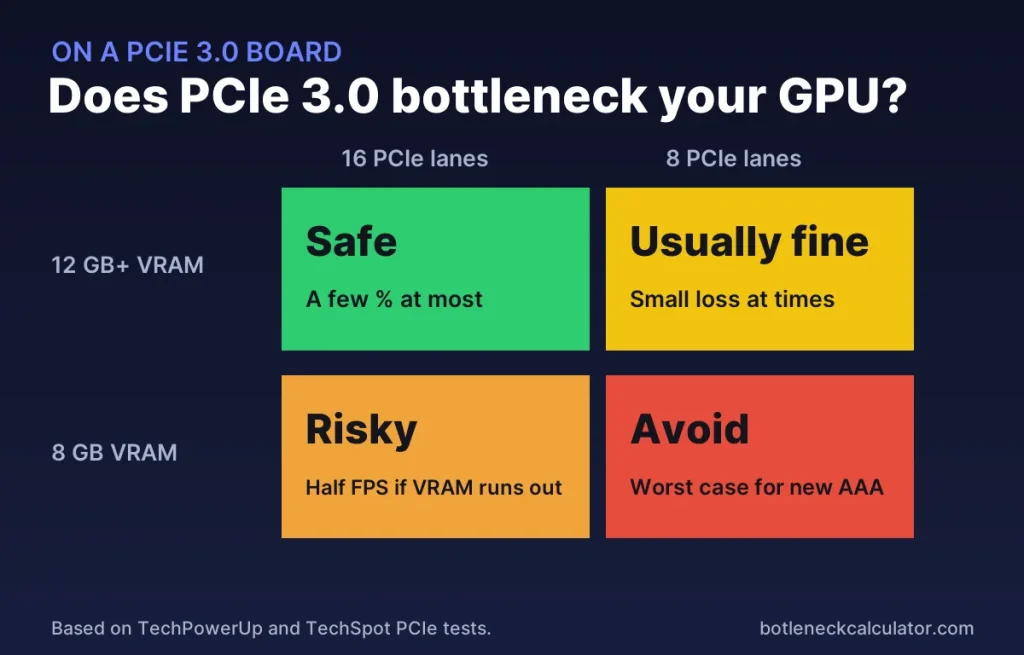
Lane counts from the manufacturers’ specifications. Check the exact model before you buy.
Show all results as a table
| Card type | Examples | On a PCIe 3.0 board |
|---|---|---|
| 16 lanes, 12 GB VRAM or more | RTX 5070, RTX 5070 Ti, RX 9070, RX 9070 XT, RX 9060 XT 16GB | Fine: a few percent at most |
| 8 lanes, 12–16 GB VRAM | RTX 5060 Ti 16GB, Arc B580 | Usually fine, small loss when bandwidth is needed |
| 16 lanes, 8 GB VRAM | RX 9060 XT 8GB | Risky: TechSpot measured about half the FPS once VRAM ran out |
| 8 lanes, 8 GB VRAM | RTX 5060 Ti 8GB, RTX 5060, RTX 4060, RX 7600 | Worst case: avoid for new AAA games, or keep textures low |
| 4 lanes | RX 6500 XT | Avoid on PCIe 3.0 |
What to do if you are on PCIe 3.0
- Buy a 16 GB card if you play new AAA games. It is the single best protection, because the card rarely needs the PCIe link for game data.
- Use the top x16 slot. Lower slots often run at x4 through the chipset.
- Turn texture quality down one step on an 8 GB card. If FPS jumps and stutter stops, you were running out of VRAM.
- Enable Resizable BAR if your board supports it. See our Resizable BAR guide.
- Upgrade the CPU only if it is the real bottleneck. On AM4, a drop-in Ryzen 7 5700X3D or 5800X3D on a B550 board also gives you PCIe 4.0. On B450 the slot stays at PCIe 3.0, but the faster CPU still helps. Our best AM4 CPU guide covers the options.
Frequently asked questions
Does PCIe 3.0 bottleneck an RTX 5070 or RX 9070?
Not noticeably. Both use 16 lanes and have 12 GB or more of VRAM, so the loss on PCIe 3.0 is a few percent, similar to the RTX 5090 results. The CPU in an older PCIe 3.0 system is a more likely limit.
Is the RTX 5060 Ti 8GB OK on PCIe 3.0?
Only for lighter games or lower settings. It uses 8 lanes, so on PCIe 3.0 it gets a quarter of its PCIe 5.0 bandwidth. In TechSpot’s tests it lost heavily in games that use more than 8 GB of VRAM. The 16 GB version is the safer choice.
Is PCIe 4.0 enough for an RTX 5090?
Yes. TechPowerUp measured about 1% difference between PCIe 4.0 x16 and PCIe 5.0 x16.
Can I put a PCIe 5.0 graphics card in a PCIe 3.0 slot?
Yes. PCIe is backward compatible, so the card works and simply runs at PCIe 3.0 speed.
Does PCIe speed affect FPS in esports games?
Very little. Games such as Counter-Strike 2, Valorant and Fortnite at competitive settings stay well within 8 GB of VRAM, so the PCIe link is rarely the limit.
Sources: TechPowerUp – RTX 5090 PCI-Express scaling, TechSpot – RTX 5060 Ti 8GB vs 16GB PCIe benchmark, TechSpot – RX 9060 XT PCIe benchmark, Gamers Nexus – RTX 5090 PCIe 5.0 vs 4.0 vs 3.0.