Is 60 FPS Good for Gaming? 30 vs 60 vs 144 FPS Explained (2026)
Yes, 60 FPS is good for gaming. It is smooth, responsive and the standard target for most single-player and casual games. For fast competitive shooters, though, 120 to 144 FPS or more on a matching high refresh rate monitor feels clearly smoother and reacts faster. Whether 60 FPS is “enough” for you depends on the games you play and the monitor you own.
Want to know if your CPU or graphics card is holding your frame rate back? Test your parts in our free bottleneck calculator.
Last updated: November 2026
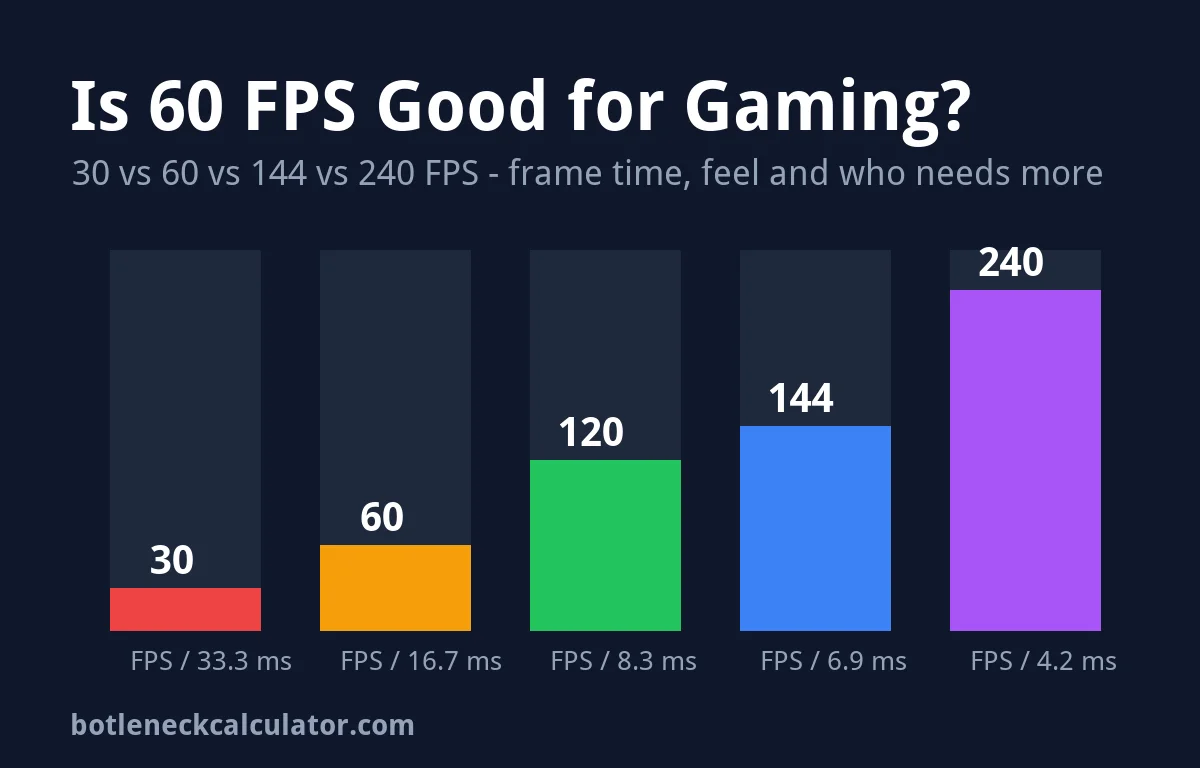
Table of ContentsShow or hide all 9 sectionsShowHide
Quick answer: what is a good FPS for gaming?
FPS (frames per second) is how many images your graphics card finishes every second. Frame time is the other side of the same number: how long each frame stays on screen. You get it by dividing 1,000 by the FPS.
| FPS | Frame time | How it feels | Good for |
|---|---|---|---|
| 30 FPS | 33.3 ms | Playable but choppy | Slow story, strategy and puzzle games |
| 60 FPS | 16.7 ms | Smooth | Most single-player and casual games |
| 120 FPS | 8.3 ms | Very smooth | Action games and casual competitive play |
| 144 FPS | 6.9 ms | Very smooth and responsive | Competitive shooters on a 144 Hz monitor |
| 240 FPS | 4.2 ms | Top-end smoothness | Esports players with a 240 Hz monitor |
The frame times are simple math (1,000 ÷ FPS). The “good for” column is our own advice, based on the sources listed at the end of this article.
Is 60 FPS good for gaming in 2026?
For most people, yes. ASUS ROG calls 60 FPS “the gold standard for casual gaming”, and it is the most common target for a first gaming PC. At 60 FPS each frame stays on screen for about 16.7 ms, which is fast enough for motion to look smooth in open-world games, RPGs, racing games played casually, and story games.
There is also a practical reason 60 FPS is so popular: for years, 60 Hz was the standard refresh rate for monitors and TVs. BenQ notes that 60 Hz is enough for most gaming. If your screen is 60 Hz, 60 FPS is the most it can show anyway.
What matters as much as the average is how steady it is. A locked 60 FPS usually feels better than a frame rate that jumps between 50 and 90, because sudden changes in frame time are what you feel as stutter. If your game hitches even with a good average, read our guide to why a PC stutters and how to fix it.
Is 60 FPS good for competitive gaming?
It works, but it is not ideal. In fast shooters like Valorant, Counter-Strike 2, Apex Legends or Fortnite, higher frame rates help in three ways, according to NVIDIA:
- Smoother animation. More frames show more steps of a moving target, which makes it easier to track and correct your aim.
- Less ghosting and smaller tears. Objects move less between frames, so trails and screen tearing are less visible.
- Lower system latency. Each stage of the CPU, GPU and display pipeline gets shorter, so you see what is happening sooner and the game feels more responsive.
NVIDIA’s own data even showed that players running about 180 FPS had a much higher kill/death ratio than players at 60 FPS in PUBG and Fortnite. NVIDIA points out that this is a correlation, not proof: players with faster PCs may simply play more. ASUS ROG suggests at least 144 FPS for competitive shooters. Our advice: if you play ranked shooters seriously, aim for 144 FPS or more on a 144 Hz or faster monitor.
60 FPS vs 144 FPS: can you see the difference?
Most people can, but only when the monitor can show it. At 144 FPS each frame lasts about 6.9 ms instead of 16.7 ms. Camera turns look cleaner and the mouse feels more direct. ASUS ROG describes 144 FPS as the point where “you really start to feel the difference”.
The gains shrink as you go higher. BenQ says very few people notice the jump from 144 Hz to 240 Hz, while the jump from 60 Hz to 144 Hz is much easier to see. In other words, going from 60 to 144 is a big upgrade, and going from 144 to 240 is a smaller one that mostly matters to competitive players.
Can a 60 Hz monitor show more than 60 FPS?
No. Refresh rate (Hz) is how many times the screen updates per second, and FPS is how many frames the GPU makes. As ASUS ROG puts it, “60Hz means 60FPS”: a 60 Hz screen can show at most 60 new frames per second. Your PC can still render more, and that can lower input latency a little, but you will not see the extra smoothness. You may also see screen tearing when the GPU and monitor are out of sync.
This is why a strong PC on a 60 Hz screen can be held back by the display. BenQ gives the example of a PC that could run a game at about 120 FPS on a 60 Hz monitor. We cover this in detail in our monitor bottleneck guide. To fix tearing, you can use V-Sync (which adds some input delay, according to NVIDIA) or a variable refresh rate display such as G-SYNC or FreeSync.
Is 30 FPS playable?
Yes, but it is the low end. ASUS ROG calls 30 FPS the minimum playable frame rate for most modern games and says it feels choppy next to higher rates. Each frame lasts 33.3 ms, twice as long as at 60 FPS. It is fine for turn-based strategy, puzzle games or a slow story game, but fast action and shooters feel sluggish. If your PC often drops below 30 FPS, lower your settings or check whether a part is too weak with our FPS calculator.
How to get a stable 60 FPS (or more)
If your PC does not reach 60 FPS, try these steps in order. The first five are free and come from common advice such as the ASUS ROG list.
- Lower heavy settings. Shadows, anti-aliasing, volumetric effects and ray tracing cost the most FPS.
- Lower the resolution or use upscaling. Going from 1440p to 1080p, or turning on DLSS, FSR or XeSS, takes load off the GPU.
- Update your GPU driver from NVIDIA, AMD or Intel.
- Close background apps in Task Manager and turn on Windows Game Mode.
- Check usage while you play. Use an overlay to see CPU and GPU load. Our guide to monitoring PC performance while gaming shows how.
- Fix the bottleneck. If GPU usage is low and one CPU core is maxed, the CPU is the limit. If GPU usage sits near 100%, the GPU is the limit. Our guide on fixing a bottleneck without upgrading helps here.
- Upgrade the right part. Only if the steps above are not enough. Our best GPU for your monitor guide matches cards to 60 Hz, 144 Hz and 240 Hz screens.
Which FPS target should you choose?
This is our own advice. Match your FPS target to your monitor and your games:
- 60 Hz monitor: aim for a steady 60 FPS. Extra frames are mostly wasted. See the best GPU for 1080p 60 Hz.
- 144 Hz monitor, single-player games: anything from 60 to 144 FPS feels good, especially with G-SYNC or FreeSync on.
- 144 Hz monitor, competitive shooters: aim for 144 FPS or more. Lower settings if needed. See the best GPU for 1440p 144 Hz.
- 240 Hz or faster: only worth chasing in esports titles where you can actually reach those frame rates.
Not sure if a specific game will hit 60 FPS on your PC? Check it with our What Games Can My PC Run tool.
Sources: NVIDIA – Why Does High FPS Matter For Esports?; ASUS ROG – A Guide to FPS in Gaming; BenQ – Are 144Hz Gaming Monitors Worth It?.
Frequently asked questions
Is 60 FPS good for gaming on PC?
Yes. 60 FPS is smooth and is the standard target for most PC games. Competitive players usually want 144 FPS or more on a high refresh rate monitor.
What is a good FPS for gaming?
30 FPS is the playable minimum, 60 FPS is good, and 120 to 144 FPS is great. 240 FPS is mainly for esports players with a 240 Hz monitor.
Is 60 FPS better than 30 FPS?
Yes. At 60 FPS each frame lasts about 16.7 ms instead of 33.3 ms, so motion is smoother and controls feel more responsive.
Do I need a 144 Hz monitor to see 144 FPS?
Yes. A monitor can only show as many frames per second as its refresh rate. On a 60 Hz screen you will see at most 60 FPS.
Why is my game not reaching 60 FPS?
Usually because settings or resolution are too high for your GPU, or because the CPU is the bottleneck. Check CPU and GPU usage while you play, then lower settings or upgrade the part that is maxed out.
Is 60 FPS good for Valorant or Fortnite?
It is playable, but higher is better. These are fast competitive games where 144 FPS or more on a 144 Hz monitor gives smoother aim and lower latency.