Does RAM Speed Impact Gaming? The Complete 2026 FPS Guide
You upgraded your GPU. You upgraded your CPU. Your average FPS counter looks great yet the game still stutters at the worst possible moment, right in the middle of a firefight or a boss fight.
Could your RAM be the reason?
Does RAM speed impact gaming? Yes but not always in the way most PC building guides describe it. RAM speed rarely moves the average FPS number by much. What it actually controls is consistency: how often your CPU has to wait for data, and how smooth each frame feels landing on your screen.
This guide breaks down exactly how RAM speed affects gaming performance in 2026, what actually matters more than the MHz number on the box, and how to know if a RAM upgrade is worth your money.
Table of ContentsShow or hide all 8 sectionsShowHide
What “RAM Speed” Actually Means
RAM speed isn’t a single spec. It’s really two numbers working together frequency and latency and both matter more than most shoppers realize.
Frequency (MHz) and Memory Bandwidth
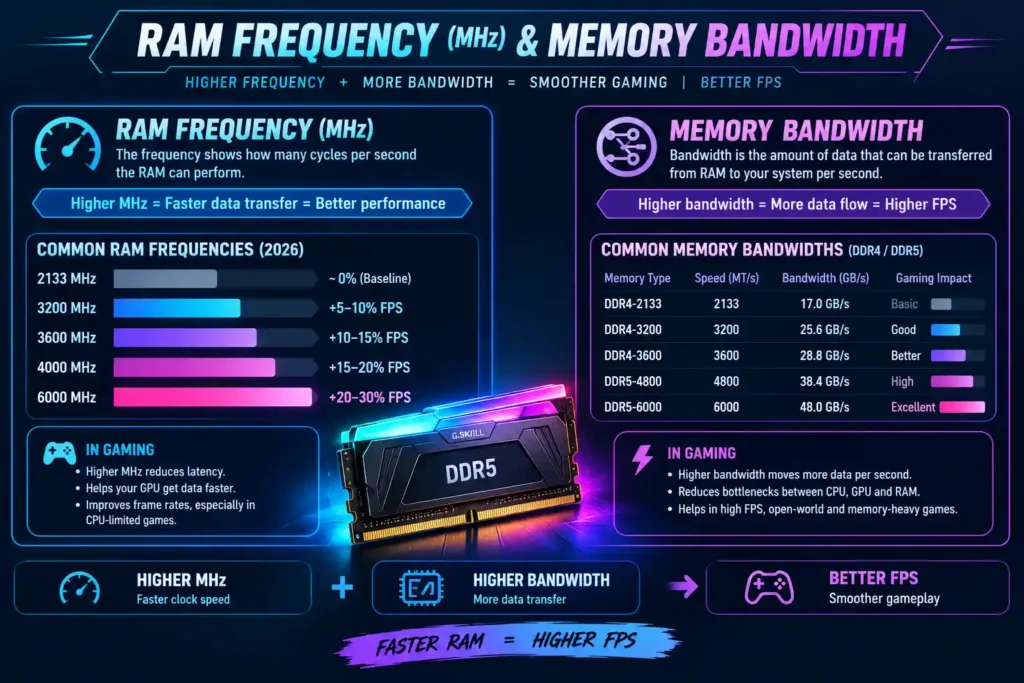
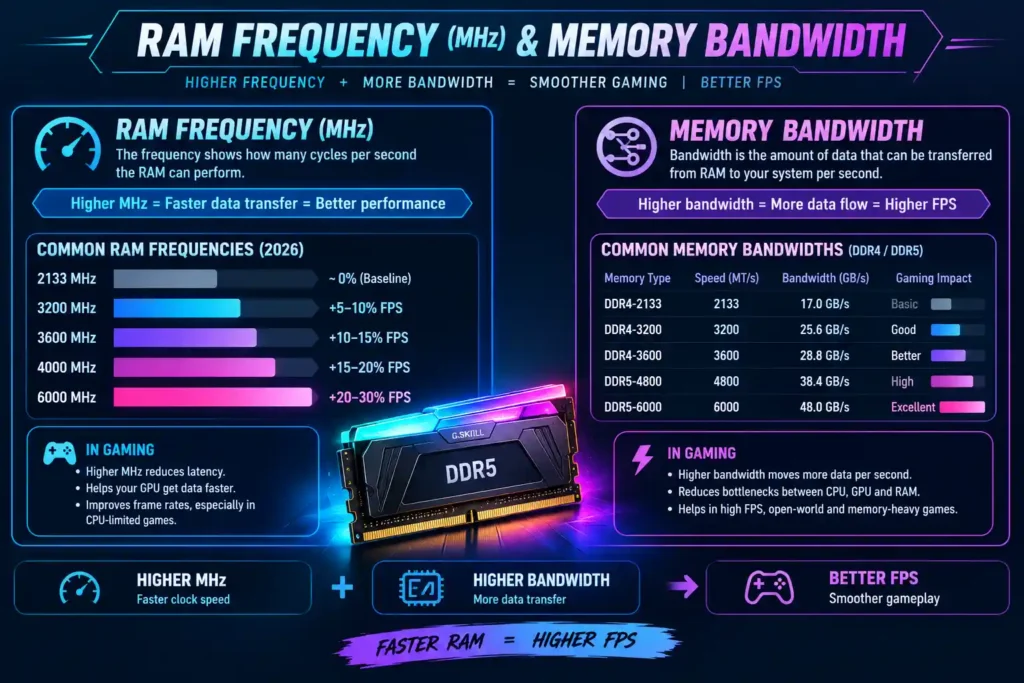
The MHz figure printed on a RAM kit (5600MHz, 6000MHz, 6400MHz) describes how many data transfers happen per second. Higher frequency means more bandwidth more data flowing between your RAM and CPU at once.
Bandwidth matters most in games that constantly stream new data: open-world titles loading textures, NPC data, and terrain on the fly. Starve the CPU of bandwidth and you get pop-in, stutter, and hitching, especially the moment you turn a corner into a new area.
CAS Latency (CL) The Number Everyone Ignores
CAS latency (CL) is the delay, measured in clock cycles, between a data request and the RAM actually delivering it. Lower CL is faster but only relative to the frequency it’s paired with.
Here’s the part most articles skip: raw CL numbers aren’t comparable across speeds. A CL30 kit at 6000MHz and a CL36 kit at 6000MHz are not the same but a CL36 kit at 6000MHz can behave similarly to a much lower CL number at a slower speed, once you calculate true latency in nanoseconds (CL ÷ (MHz/2000) × 1000). This is why comparing two kits by CL alone, without checking frequency, is misleading and why shoppers regularly overpay for a “low CL” kit that isn’t actually faster in practice.
Why You Need Both High Frequency and Low Latency
Fast frequency with poor latency is like a wide highway with a slow on-ramp data eventually moves quickly, but it takes too long to get started. The best real-world gaming performance comes from a balanced kit, not the highest MHz number you can find on the shelf.
| RAM Configuration | True Latency (approx.) | Verdict |
| DDR4-3200 CL16 | ~10.0 ns | Reliable budget baseline |
| DDR4-3600 CL18 | ~10.0 ns | Strong DDR4 sweet spot |
| DDR5-5600 CL36 | ~12.9 ns | 2026 mainstream sweet spot |
| DDR5-6000 CL30 | ~10.0 ns | Best balance of speed and value |
| DDR5-8000+ CL38+ | ~9.5 ns | Diminishing returns, high cost |
How RAM Speed Affects Gaming Performance (2026 Data)
Average FPS vs. 1% Lows The Metric That Actually Matters
Most players only watch the average FPS counter. But the number that determines whether a game feels smooth is the 1% low the average frame rate during the worst 1% of frames in a session.
In CPU-bound titles, moving from a slow, unoptimized RAM configuration to a properly tuned kit lifts 1% lows noticeably more than it lifts average FPS. In practice, that means your frame counter might barely change while stuttering all but disappears because RAM speed smooths out the worst moments, not just the best ones. This is the single most misunderstood part of the RAM-speed debate, and it’s why two systems with identical average FPS can feel completely different to play.
Frequency Gains in Real Games
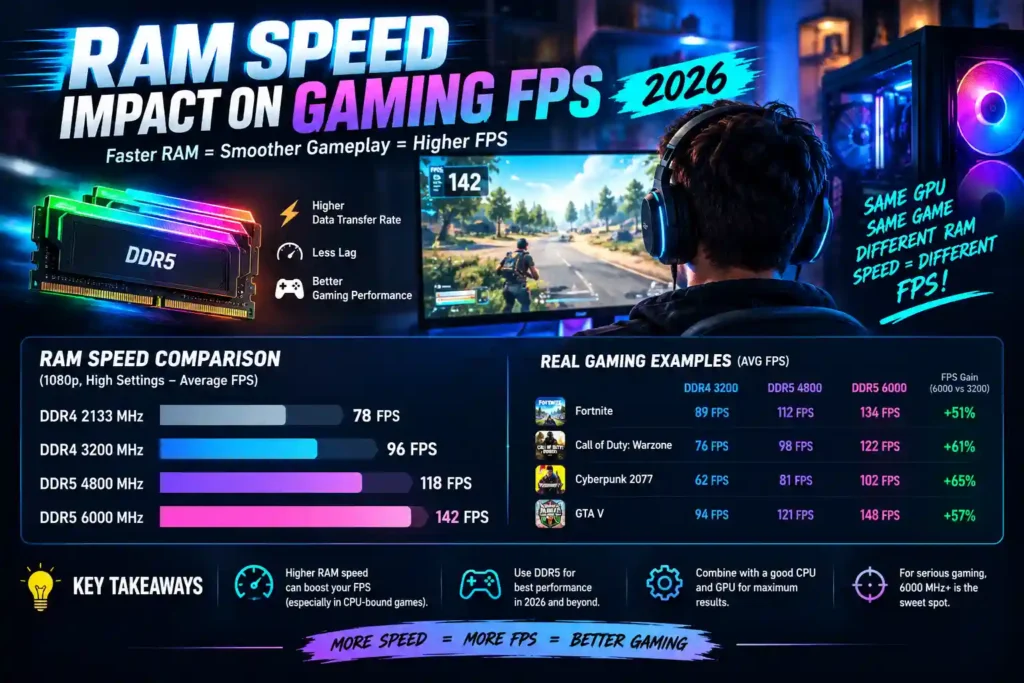
Moving from the JEDEC baseline (DDR5-4800) to the DDR5-6000 sweet spot helps most in CPU-bound games at 1080p, but how much depends on the processor. CPUs with a large cache, such as AMD’s X3D chips, are far less sensitive: AMD says the Ryzen 7 9850X3D loses less than 1% in games on DDR5-4800 instead of DDR5-6000 (report), and Phoronix tested the same pair of speeds across 300+ benchmarks. CPUs without the extra cache usually gain more, so enabling EXPO or XMP is still worth doing.
Dual-Channel Matters as Much as MHz
A detail most RAM guides bury: running a single memory stick instead of a matched dual-channel kit roughly halves your available bandwidth to the CPU. Two sticks in dual-channel mode at the same speed can produce 10–20% higher FPS in CPU-limited scenarios than one larger single stick (Gamers Nexus measured up to 15% more FPS with dual channel) a bigger jump than most frequency upgrades alone deliver. Always buy RAM in matched pairs, even if a single bigger stick looks like better value on paper, and always confirm you’re populating the correct dual-channel slots (usually A2/B2) listed in your motherboard manual.
Loading Times and Open-World Streaming
Fast RAM shows up most clearly in games that never stop loading think Starfield, Cyberpunk 2077, or any large open-world title. When memory is too slow, the CPU sits idle waiting on data, which is exactly what causes late texture pop-in or a split-second freeze when you cross into a new zone. Faster, well-paired memory keeps that data pipeline full, so streaming stays invisible instead of interrupting the experience.
When RAM Speed Matters and When It Doesn’t
Whether RAM speed changes your experience depends entirely on where your bottleneck actually is.
CPU-Bound Scenarios (Esports, 1080p, High Refresh Rate)
In competitive shooters and MOBAs run at 1080p on a high-refresh monitor, the CPU is usually the limiting factor, not the GPU. Here, RAM speed has real, felt impact faster memory keeps the CPU fed and reduces frame-time spikes during intense fights, which is exactly when a stutter costs you the most.
GPU-Bound Scenarios (4K, Ray Tracing, AAA Visuals)
Push resolution to 4K with ray tracing enabled and the GPU becomes the bottleneck instead. In this scenario, the gap between slow and fast RAM shrinks to a few percent at most your money is better spent on the graphics card than on a faster memory kit.
CPU Architecture Changes the Equation
Not every CPU reacts to RAM speed equally. AMD’s Ryzen chips are especially sensitive because their internal Infinity Fabric interconnect is clocked in sync with memory speed DDR5-6000 is widely regarded as the practical sweet spot before returns flatten out or even reverse at higher speeds. CPUs with very large L3 cache (like AMD’s X3D chips) rely less on raw memory speed because more data stays cached on-die, shrinking the RAM speed advantage noticeably. If you’re on an X3D chip, capacity and stability matter more than chasing extra MHz.
RAM Speed vs. RAM Capacity Which Comes First?
If your budget forces a choice between faster RAM and more RAM, capacity wins almost every time.
Why Capacity Comes Before Speed
If a modern game needs more memory than you have installed, your system starts paging to storage and no amount of frequency or low latency fixes that kind of stutter. Running out of RAM is a far bigger performance killer than running slightly slower RAM, and it’s the first thing to rule out before blaming your memory speed at all.
How Much RAM Do You Actually Need in 2026?
- 16GB DDR5 (dual-channel) still covers most current titles comfortably and remains a valid baseline for pure gaming builds.
- 32GB DDR5 is now the practical sweet spot for anyone gaming while streaming, running Discord, and keeping a browser open in the background.
- 64GB is overkill for gaming alone it’s aimed at creators doing video editing or 3D rendering alongside gaming.
Once capacity is sorted, then chase speed. A fast 16GB kit that constantly runs out of headroom will lose to a properly sized 32GB kit in real-world smoothness every time.
DDR4 vs. DDR5 in 2026 Is the Upgrade Still Worth It?
The Real-World FPS Gap
DDR5 platforms are now the default on current-generation Intel and AMD builds. In CPU-bound games, DDR5 typically delivers a mid-single-digit to low-double-digit FPS advantage over well-tuned DDR4 meaningful for competitive players, less noticeable for anyone gaming at 4K.
Should You Upgrade an Existing DDR4 System?
If you’re already running fast, properly tuned DDR4 (3600MHz CL18 or better) on a system that isn’t due for a full platform change, the DDR5 jump alone rarely justifies a new motherboard and CPU. It becomes an easy call only when you’re building fresh on a current-gen platform anyway, where DDR5 is often the only option.
Don’t Forget to Enable XMP / EXPO
This is the single most-skipped step in any RAM upgrade. Without enabling XMP (Intel) or EXPO (AMD) in the BIOS, RAM defaults to a conservative JEDEC speed often thousands of MHz slower than what you paid for. Turning this on is free performance that takes thirty seconds, and skipping it is the single most common reason people feel like their “fast” RAM upgrade did nothing.
How to Check if RAM Is Actually Your Bottleneck
Before spending money on new memory, confirm it’s actually the problem.
Watch Your Usage in Real Time
Open Task Manager or a monitoring overlay while gaming and watch GPU usage. If it’s pinned near 99% consistently, your GPU is the bottleneck and RAM speed won’t move the needle much. If GPU usage dips while CPU usage spikes, or RAM usage is consistently near its ceiling, memory is more likely the limiting factor.
Use a Bottleneck Calculator Before You Buy
Rather than guessing, run your exact CPU, GPU, and resolution through a dedicated bottleneck calculator. It’ll tell you which component is actually holding your system back before you spend money on a RAM kit that might not move your FPS at all a five-minute check that can save you a wasted purchase.
→ Check your exact CPU, GPU, and RAM setup with our free Bottleneck Calculator find out whether RAM speed is really your problem before you spend a dime.
Conclusion So, Does RAM Speed Impact Gaming?
Yes but its biggest win is smoothness, not headline FPS numbers. Faster, well-tuned RAM reduces stutter and improves 1% lows far more than it raises your average frame count.
Quick takeaways:
- Competitive / esports players at 1080p: RAM speed matters prioritize a fast, low-latency dual-channel kit.
- 4K / ray-tracing gamers: Prioritize GPU spend and enough capacity (32GB) over chasing extra MHz.
- Everyone: Enable XMP/EXPO today it’s free performance you’re already paying for.
- Before buying anything: Confirm RAM is actually your bottleneck rather than assuming.
Before you jump into the 2026 RAM market, get your capacity right first, aim for the DDR5 sweet spot if you’re upgrading, and most importantly run your setup through a bottleneck calculator before spending money on a kit that might not fix the issue at all.
Frequently Asked Questions
Does RAM speed affect FPS significantly?
In CPU-heavy, competitive games at 1080p, yes faster RAM can meaningfully lift both average FPS and 1% lows. At 4K with a strong GPU, the difference shrinks to a few percent at most.
Is 5600MHz DDR5 good enough for gaming in 2026?
Yes. 5600MHz DDR5 is the current mainstream sweet spot, runs natively on modern Intel and AMD platforms, and comfortably handles virtually every current title.
Does RAM speed matter more for AMD or Intel CPUs?
AMD Ryzen CPUs are generally more sensitive to RAM speed because of their Infinity Fabric design. Intel CPUs can typically run higher speeds but see smaller gains beyond the mainstream sweet spot.
Should I prioritize RAM speed or RAM capacity?
Capacity first. Running out of RAM causes far worse stutter than running slightly slower RAM. Hit your capacity target (16GB minimum, 32GB ideal), then optimize for speed.
What is XMP/EXPO and why does it matter?
XMP (Intel) and EXPO (AMD) are BIOS profiles that let your RAM run at its advertised speed instead of a slower default. Without enabling it, you’re leaving paid-for performance unused.
Can mismatched RAM sticks slow down my system?
Yes. Motherboards typically force all installed RAM to run at the speed of the slowest stick, so mixing kits can silently cap your performance always buy a matched dual-channel kit.
Will faster RAM fix game stuttering?
It depends on the cause. If stutter comes from the CPU waiting on data or slow asset streaming, faster RAM can help significantly. If it’s caused by a weak GPU or thermal throttling, RAM speed won’t fix it check your bottleneck first.
Is it worth buying RAM faster than DDR5-6400 for gaming?
Rarely. Past roughly DDR5-6400, gains flatten sharply and, on some AMD platforms, pushing too far past the Infinity Fabric sweet spot can actually hurt stability and performance. Put that budget toward capacity or your GPU instead.