How to Enable XMP or EXPO in BIOS (and Is It Safe?)
To enable XMP or EXPO, restart your PC, press Delete (or F2) to open the BIOS, find the memory profile setting (often called XMP, EXPO, A-XMP or AI Overclock Tuner), choose Profile 1, then save and restart. Without it, your RAM runs at a slow default speed instead of the speed on the box. It is a safe, tested profile from the memory maker, but update your BIOS first, especially on AMD Ryzen 7000 and 9000 systems.
This guide explains what XMP and EXPO do, how to turn them on for ASUS, MSI, Gigabyte and ASRock boards, how to check that they work, and what to do if your PC does not boot. To see whether memory or your processor is what holds back your FPS, try our free bottleneck calculator.
Last updated: November 2026
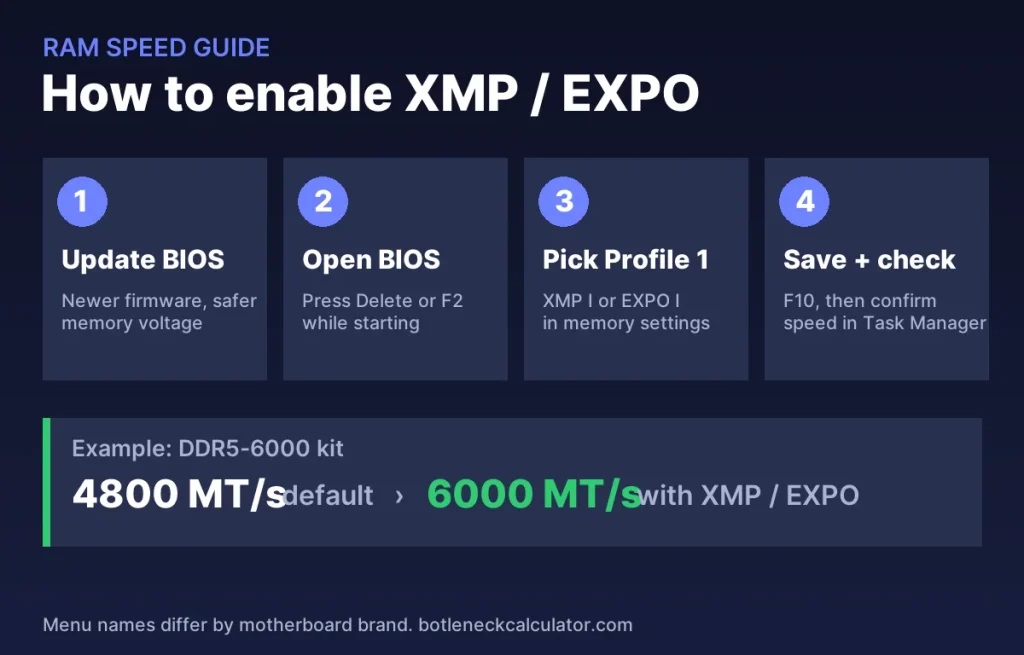
Table of ContentsShow or hide all 7 sectionsShowHide
What are XMP and EXPO?
Every memory stick has a safe default speed set by the JEDEC standard. Faster kits, such as DDR5-6000, also store a tested profile with their rated speed, timings and voltage. Your PC does not use that profile until you turn it on in the BIOS.
- XMP (Extreme Memory Profile) is Intel’s profile format. It has existed since DDR3, and XMP 3.0 for DDR5 can hold more than one profile.
- EXPO is AMD’s profile format for DDR5 on AM5 boards (Ryzen 7000 and 9000). EXPO 1 is the standard profile; some kits add a second one.
- Many AMD boards can also load XMP profiles. Depending on the brand, this is called A-XMP, DOCP or simply XMP.
How to check if XMP or EXPO is already on
Press Ctrl + Shift + Esc, open Performance and click Memory. Compare the speed shown with the speed on your RAM box or listing. If a DDR5-6000 kit shows 4800 MT/s, or a DDR4-3200 kit shows 2133 or 2400, the profile is off. The free tool CPU-Z shows the same on its Memory tab, and the stored profiles on its SPD tab. Note that CPU-Z shows half the rated number, so 3,000 MHz means DDR5-6000.
How to enable XMP or EXPO in BIOS, step by step
- Update your BIOS first. Newer BIOS versions improve memory compatibility, and on AMD AM5 boards they include AMD’s voltage safety limit (see below).
- Open the BIOS. Restart and press Delete repeatedly before Windows starts. Some boards use F2.
- Find the memory profile. Many boards show it on the first (Easy or EZ) screen as a drop-down or switch. In Advanced mode, look under Overclocking, AI Tweaker or Memory.
- Choose Profile 1 (XMP I or EXPO I). It is the tested profile with the rated speed.
- Save and restart, usually with F10.
- Check the speed again in Task Manager or CPU-Z.
| Motherboard brand | Where to look (names vary by BIOS version) |
|---|---|
| ASUS | EZ Mode, or Ai Tweaker > Ai Overclock Tuner > XMP I / EXPO I (DOCP on older AMD boards) |
| MSI | XMP or EXPO switch on the EZ Mode screen, or OC > memory profile |
| Gigabyte | Tweaker > Extreme Memory Profile (X.M.P.) or EXPO |
| ASRock | OC Tweaker > DRAM Configuration > load XMP or EXPO setting |
The first restart can take longer. DDR5 systems often train the memory after a change, and the screen may stay black for a minute or more. Do not turn the PC off during this time.
Is XMP or EXPO safe?
For most PCs, yes. The profile is created and tested by the memory maker, and it only runs the RAM at the speed it was sold for. TechRadar calls EXPO safe and recommended. Two things are worth knowing:
- It counts as overclocking. Running above the JEDEC default is technically outside the processor’s base specification, and some motherboard makers state that XMP and EXPO speeds are not guaranteed. Check your own warranty terms if you are unsure.
- Update the BIOS on AM5. In 2023 some Ryzen 7000 systems were damaged by too much SoC voltage with EXPO on. AMD then released firmware that limits SoC voltage to 1.3 V when an EXPO profile is enabled, so make sure your BIOS is up to date.
How much FPS does XMP or EXPO add?
It depends on what limits your PC. AMD claimed games ran about 11% faster at 1080p with EXPO, but in games where the graphics card is the limit, such as at 1440p and 4K, the difference is small. The gain is largest in CPU-heavy games, at high frame rates and with integrated graphics. Our guide on how RAM speed affects FPS has more detail, and using two sticks matters too: see single vs dual channel RAM.
What to do if your PC will not boot after enabling XMP or EXPO
- Wait. Give memory training a few minutes before you assume a problem.
- Let the board recover. Many boards undo the setting after a few failed starts and boot with safe defaults.
- Clear CMOS with the button on the back panel or the jumper described in your manual, which resets the BIOS.
- Reseat the sticks and use the slots your manual recommends for two sticks.
- Update the BIOS and try again, or pick a slightly lower memory speed by hand. Four sticks and mixed kits are harder to run at full speed.
Want to know what else limits your FPS? Check your parts in our bottleneck calculator and see the expected frame rate in the FPS calculator.
Sources: Corsair – How to enable XMP/EXPO in BIOS; TechRadar – What is AMD EXPO?; Tom’s Hardware – Ryzen burnouts and EXPO warnings.
Frequently asked questions
Should I enable XMP or EXPO?
Yes, for most gaming PCs. Without it you pay for fast memory but run it at a slow default speed. Update the BIOS first and check that the PC is stable afterwards.
What is the difference between XMP and EXPO?
XMP is Intel’s memory profile format and EXPO is AMD’s format for DDR5 on AM5. Both store a tested speed, timings and voltage. Many AMD boards can also read XMP profiles.
Does XMP void my warranty?
It is technically overclocking, and terms differ between manufacturers, so check your processor and motherboard warranty. XMP and EXPO are used on most gaming PCs with fast memory.
Which profile should I choose, 1 or 2?
Start with Profile 1. It runs the speed printed on the box. A second profile, if your kit has one, is usually more aggressive and may need more voltage.
Why is my RAM speed half of what I bought?
Tools like CPU-Z show the real clock, which is half the rated transfer rate. 3,000 MHz in CPU-Z is correct for DDR5-6000. If Task Manager also shows a lower number than the box, XMP or EXPO is off.
Can I enable XMP on a laptop?
Usually not. Most laptop BIOS menus do not offer memory profiles, and laptop memory already runs at the speed the manufacturer set.