What Is AMD 3D V-Cache (X3D)? Is It Worth It for Gaming in 2026?
AMD 3D V-Cache is an extra layer of L3 cache that AMD stacks directly on its Ryzen processors. Chips that have it carry an “X3D” name, such as the Ryzen 7 9800X3D or the older Ryzen 7 5800X3D. That extra cache is the main reason X3D processors top almost every gaming CPU chart. This guide explains how 3D V-Cache works, how much faster it really is in games, when it does not help, and which X3D chip makes sense for your build.
Quick answer: 3D V-Cache adds 64 MB of L3 cache on top of (or under) the CPU cores, so an 8-core X3D chip has 96 MB of L3 instead of 32 MB. In CPU-limited games this is worth roughly 15 to 30% more FPS over the same chip without it, with better 1% lows. The gain shrinks at 1440p and 4K, where the graphics card does most of the work. For a gaming PC, an X3D chip is worth it if you have a fast GPU or play CPU-heavy games. For rendering or video work, a regular Ryzen with more cores is often the better buy.
Table of ContentsShow or hide all 10 sectionsShowHide
What is AMD 3D V-Cache?
Every processor has a small amount of very fast memory, called cache, built into the chip. When the CPU needs data that is already in cache, it gets it almost instantly. When the data is not there (a “cache miss”), the CPU has to wait for your system RAM, which is many times slower.
A normal 8-core Ryzen chip has 32 MB of L3 cache. 3D V-Cache adds a separate 64 MB cache die and bonds it vertically to the processor die, so the same 8 cores get 96 MB of L3. “3D” refers to this stacking: instead of making the chip wider, AMD builds it upward. The cores and their speed stay the same. What changes is how often they have to wait for RAM.
Why does more cache help in games?
Games constantly juggle large, unpredictable sets of data: positions of players and objects, physics, AI, and the draw calls the CPU prepares for the graphics card. Most of that data does not fit in a normal L3 cache, so the CPU keeps going back to RAM. With three times the cache, far more of it stays on the chip.
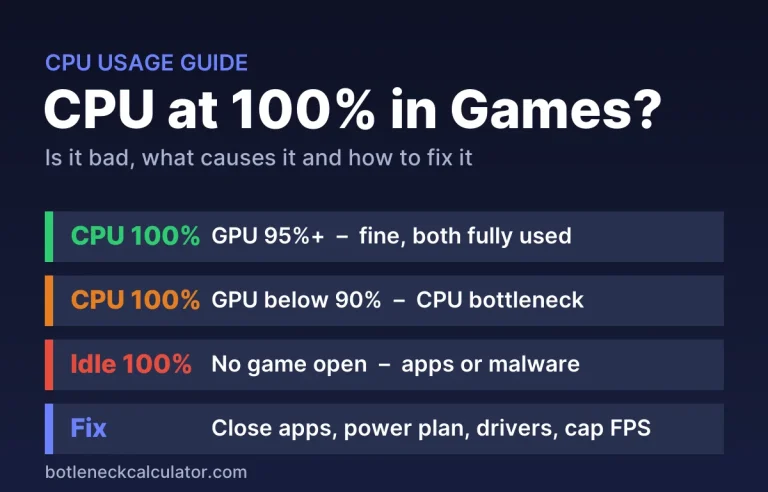
The result is that the CPU prepares frames faster and more evenly. This matters most in a CPU bottleneck, where the graphics card is waiting for the processor and its usage stays below about 95%. It also raises 1% lows, the slowest frames that you feel as stutter. Many everyday apps, rendering and video encoding work on data that streams through predictably, so they gain little or nothing from the extra cache.
First-gen vs second-gen 3D V-Cache
AMD has used two layouts so far, and the difference explains why newer X3D chips run faster:
- Cache on top (Ryzen 5000X3D and 7000X3D): the cache die sits above the cores, between them and the cooler. It traps some heat, so AMD had to lower clock speeds and voltage, and most of these chips cannot be overclocked.
- Cache underneath (Ryzen 9000X3D): starting with the Ryzen 7 9800X3D, AMD moved the cache die below the cores. The cores now touch the heat spreader directly, which AMD says lowers thermal resistance. Clock speeds are much closer to the regular Ryzen 9000 chips, and the 9000X3D parts can be overclocked.
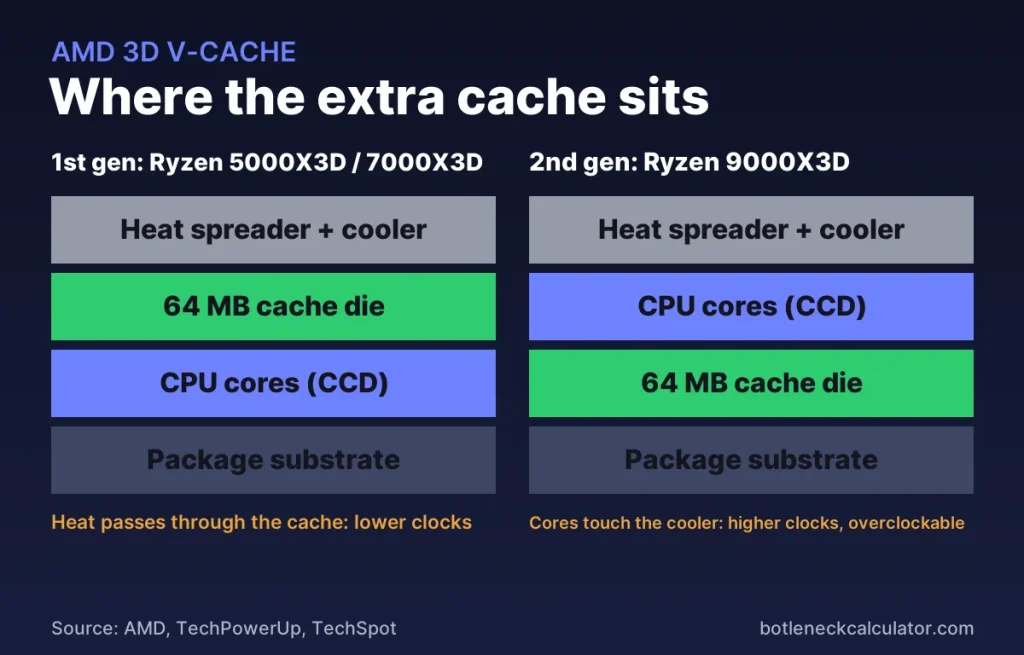
That is why the Ryzen 7 9800X3D boosts to 5.2 GHz, 200 MHz higher than the 7800X3D, and runs 500 MHz higher at base clock (TechSpot). The newer Ryzen 7 9850X3D uses the same design with a 5.6 GHz boost.
How much faster is an X3D CPU in games?
The cleanest test is to compare an X3D chip with the same chip without the extra cache. These results come from independent reviews that used a very fast graphics card so the CPU was the limit:
X3D gains depend on the game. CPU-heavy titles such as Baldur’s Gate 3 and simulators gain the most.
Show all results as a table
| Comparison | Gaming difference | Test |
|---|---|---|
| Ryzen 7 5800X3D vs 5800X | +19% average at 1080p, up to +50% in some games | TechPowerUp, 53 games, RTX 4090 |
| Ryzen 7 9800X3D vs 9700X | About +30% average | TechSpot, 14 games, RTX 4090 |
| Ryzen 7 9800X3D vs 7800X3D | +8 to 11% average | TechSpot |
| Ryzen 7 9800X3D vs Core Ultra 9 285K | About +33% average | TechSpot, 14 games |
| Ryzen 7 9850X3D vs 9800X3D | +3.2% average, +3.5% in 1% lows | Tom’s Hardware, 16 games, 1080p |
Two things stand out. First, the jump from a regular chip to its X3D version (around 20 to 30%) is bigger than most generational upgrades. Second, the step from one X3D generation to the next is smaller: TechSpot measured the 9800X3D at 8 to 10% ahead of the 7800X3D across 14 games, and the 9850X3D adds only about 3% more.
Does 3D V-Cache help at 1440p and 4K?
Less, and sometimes not at all. At higher resolutions the graphics card works harder on every frame, so the CPU has more time to keep up and the extra cache matters less. TechPowerUp’s 53-game test of the 5800X3D against the 5800X with an RTX 4090 shows this clearly:
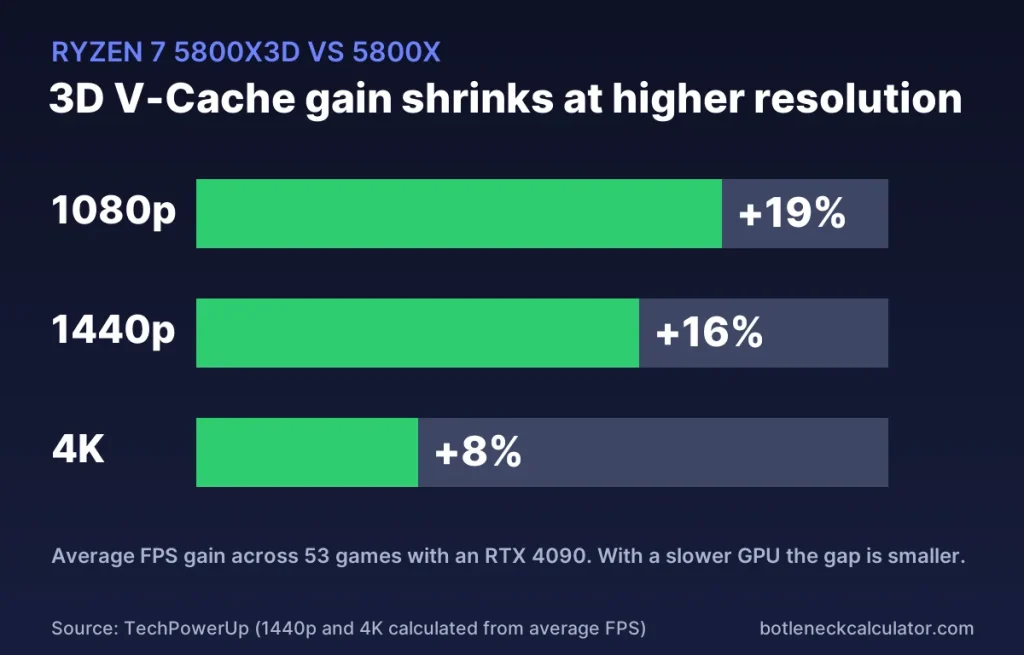
Those figures were measured with the fastest graphics card of its time. With a mid-range card the gap gets smaller again. When HotHardware paired the 5800X3D with entry-level cards (RTX 3060, Arc A750 and RX 7600), only about half of the seven games showed a clear benefit, mostly CPU-heavy ones such as Fortnite, Stellaris and Baldur’s Gate 3.
So the real question is not “is X3D faster” but “is my CPU the part holding me back”. If your GPU already runs at 95 to 100% in your games, a faster CPU of any kind adds little. If GPU usage sits well below that, the CPU is the limit and an X3D chip is one of the best fixes. Our guide to low GPU usage shows how to check.
Every desktop X3D CPU at a glance
L3 cache totals as listed by AMD and in reviews. Six-core X3D models have appeared in smaller quantities or in specific regions.
Show all results as a table
| Platform | X3D chips | Cores | L3 cache | Notes |
|---|---|---|---|---|
| AM4 (DDR4) | Ryzen 7 5800X3D, Ryzen 7 5700X3D | 8 | 96 MB | Best drop-in upgrade for older AM4 boards |
| AM4 (DDR4) | Ryzen 5 5600X3D, Ryzen 5 5500X3D | 6 | 96 MB | Limited or regional availability |
| AM5 (DDR5) | Ryzen 7 7800X3D | 8 | 96 MB | Cache on top of the cores |
| AM5 (DDR5) | Ryzen 7 9800X3D, Ryzen 7 9850X3D | 8 | 96 MB | Cache under the cores, overclockable |
| AM5 (DDR5) | Ryzen 9 9900X3D, Ryzen 9 9950X3D | 12 / 16 | 128 MB | Cache on one of the two core dies |
| AM5 (DDR5) | Ryzen 9 9950X3D2 | 16 | 192 MB | Cache on both core dies |
Ryzen 9 X3D chips: more cores, not more FPS
Ryzen 9 processors have two core dies (CCDs). On the 9900X3D and 9950X3D, only one of them has the extra cache, and Windows tries to keep games on that die. You pay for the extra cores mainly for work such as rendering and compiling.
The Ryzen 9 9950X3D2 puts a cache die under both CCDs for 192 MB of L3. Tom’s Hardware found that it “matches the Ryzen 7 9800X3D in games”, with little to no advantage and slight regressions in some titles, and said the Ryzen 7 9850X3D offers a better gaming experience. For a pure gaming PC, an 8-core X3D chip is the smarter buy.
Is an X3D CPU worth it for you?
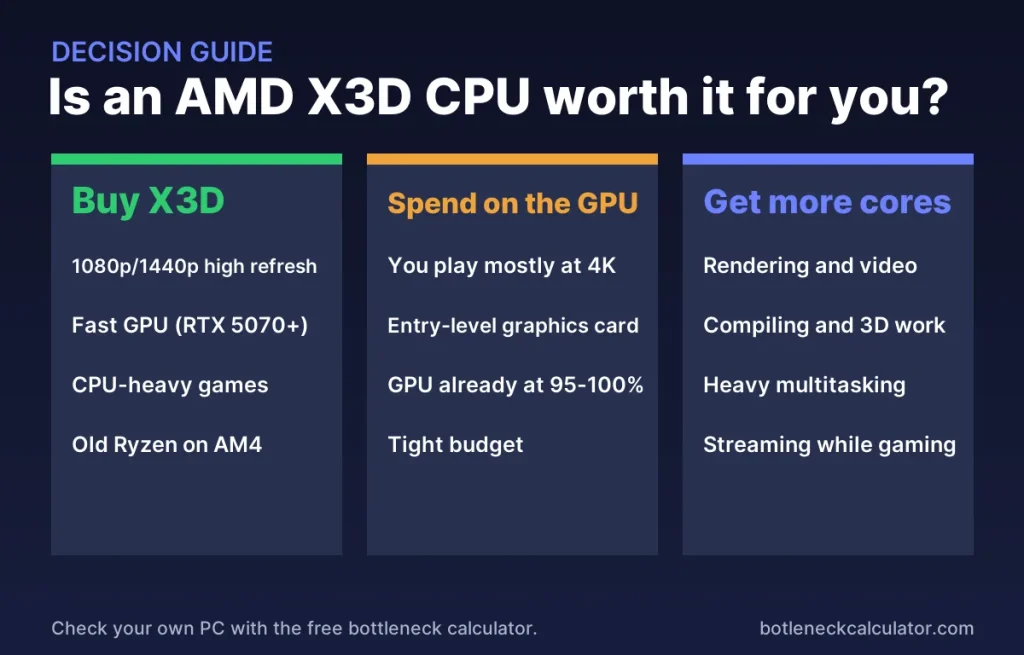
- Worth it: you play at 1080p or 1440p with a high-refresh monitor, own a fast graphics card (around RTX 5070 or RX 9070 class and up), or play CPU-heavy games such as strategy, simulation, MMOs and competitive shooters.
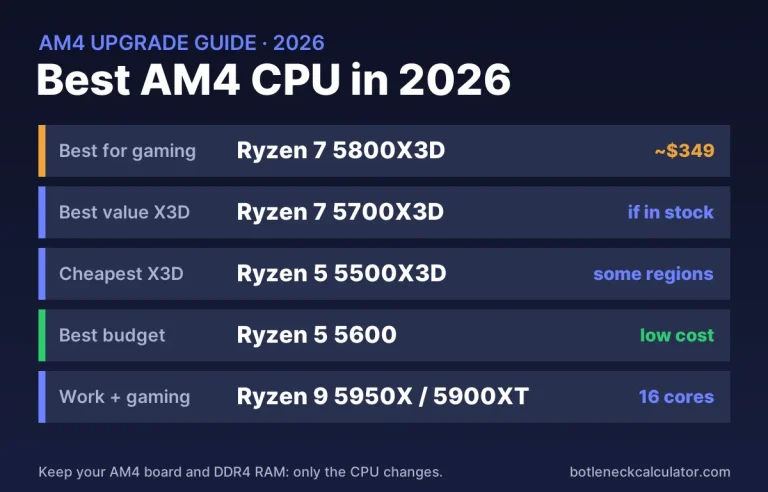
- Worth it on AM4: you have an older Ryzen such as a 3600 or 5600 on an AM4 board. A 5700X3D or 5800X3D is a drop-in upgrade that needs only a BIOS update. See our best AM4 CPU guide.
- Probably not: you play mostly at 4K, use an entry-level graphics card, or your GPU already runs at 95 to 100% in your games. Spend the money on the graphics card instead.
- Not the best choice: your main workload is rendering, video encoding or other multi-core tasks. A regular Ryzen 9 with more cores, or a higher-core Intel chip, will usually do more for the money.
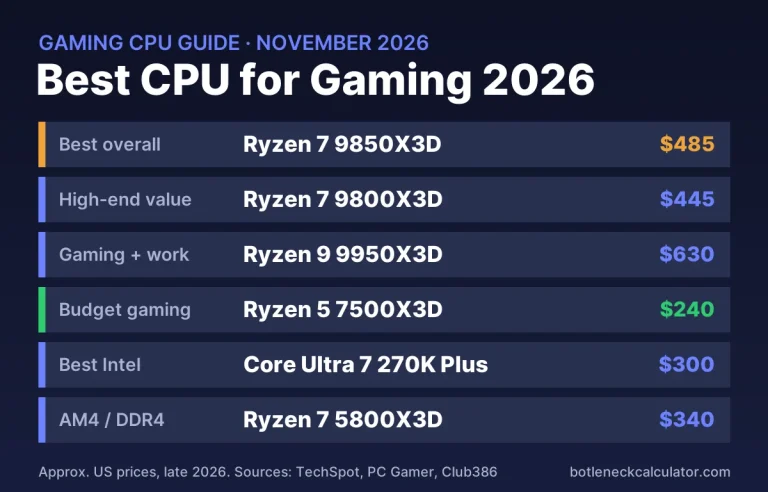
If you are still choosing between models, our best gaming CPU guide compares current X3D and Intel options, and the CPU tier list ranks every popular processor.
How to check if an X3D chip would help your PC
- Enter your current CPU, graphics card, RAM and resolution in the bottleneck calculator. If it reports a CPU bottleneck at the resolution you play at, a faster CPU will help.
- Swap in an X3D model in the calculator and compare the result, or use Compare to put two processors side by side.
- Confirm in a real game with an overlay such as MSI Afterburner. GPU usage well below 95% while one or more CPU threads sit near 100% means the CPU is the limit.
Frequently asked questions
What does X3D mean on a Ryzen CPU?
X3D means the processor has AMD 3D V-Cache, an extra 64 MB of L3 cache stacked on the chip. An 8-core X3D model has 96 MB of L3 in total, three times the 32 MB of a regular 8-core Ryzen.
Is 3D V-Cache only useful for gaming?
Mostly. Games benefit the most because they work on large, unpredictable data. Some simulation and technical workloads also gain, but rendering, video encoding and everyday apps see little or no difference.
Is the Ryzen 7 9800X3D still worth it over the 9850X3D?
For most people, yes. Tom’s Hardware measured the 9850X3D only 3.2% faster across 16 games at 1080p, while drawing more power. Buy whichever is cheaper at the time.
Can I overclock an X3D CPU?
Ryzen 9000X3D chips can be overclocked because the cache now sits under the cores. Most Ryzen 5000X3D and 7000X3D chips are locked, though you can still use features such as Curve Optimizer on supported boards.
Does an X3D CPU need fast RAM?
Less than a regular Ryzen, because the large cache hides much of the RAM delay. Use a matched dual-channel kit and enable EXPO or XMP. Our guide on RAM speed and FPS covers the details.
Does Intel have a CPU like X3D?
Intel’s current desktop Core Ultra 200S chips do not use stacked cache. The Core Ultra 9 285K has 36 MB of L3, and TechSpot measured the 9800X3D about 33% faster in its 14-game average.
Sources: TechPowerUp – Ryzen 7 5800X vs 5800X3D, 53 games, TechSpot – Ryzen 7 9800X3D review, TechSpot – Every Ryzen X3D CPU tested, Tom’s Hardware – 9850X3D vs 9800X3D, Tom’s Hardware – Ryzen 9 9950X3D2 review, TechPowerUp – 9800X3D cache below the CCD, HotHardware – 3D V-Cache with entry-level GPUs.